출처 : http://lotus.tistory.com/78
Map 같은 자료구조로 이터레이션 할때 여러가지 방법을 쓸 수 있는데 검색하다가 깔끔한 코드를 발견해서 첨부해 본다. ㅋ
난 자바 뉴비..ㅎㅎ
- 그저 그런 방법
- 좀 더 깔끔한 방법
출처 : http://lotus.tistory.com/78
Map 같은 자료구조로 이터레이션 할때 여러가지 방법을 쓸 수 있는데 검색하다가 깔끔한 코드를 발견해서 첨부해 본다. ㅋ
난 자바 뉴비..ㅎㅎ
- 그저 그런 방법
첨부한 파일을 다운 받아서 프로젝트에 넣어주시구요.
(출처 : http://flexology.wordpress.com/2008/09/30/loadinganimated_gif_in_flex/ )
AnimatedGIFImage.as 파일을 추가합니다.
소스는 아래와 같습니다.
package gif
{
import flash.net.URLRequest;
import mx.controls.Image;
import mx.core.UIComponent;
import org.gif.player.GIFPlayer;
public class AnimatedGIFImage extends Image
{
private var _gifImage:UIComponent;
public function AnimatedGIFImage()
{
super();
this._gifImage=new UIComponent();
}
override public function set source(value:Object):void
{
if (!value is String)
{
throw new ArgumentError("Source must be of type String");
}
super.source=value;
}
override protected function createChildren():void
{
super.createChildren();
var player:GIFPlayer=new GIFPlayer();
player.load(new URLRequest(this.source as String));
this._gifImage.addChild(player);
}
override protected function updateDisplayList(unscaledWidth:Number, unscaledHeight:Number):void
{
this.addChild(this._gifImage);
super.updateDisplayList(unscaledWidth, unscaledHeight);
}
}
}
그리고 사용하실땐
<gif:AnimatedGIFImage source="test.gif" width="100" height="100"/> 와 같이 사용하시면 됩니다.
Trees when I'm loading the children dynamically. So instead of trying to get animated gifs to work (see this example if you are interested) I created a relatively simple Spinner class that draws a circular spinner using just Flex Graphics. The spinner is animated using a Timer. If you set the startImmediately property to true then the animation starts when the spinner component is added to a parent component. And it is always stopped when it gets removed from its parent. <ui:Spinner Properties delay="100" startImmediately="false" Styles backgroundAlpha="1" backgroundColor="NaN" spinnerColor="#829AD1" spinnerHighlightColor="#001A8E" spinnerThickness="3" spinnerLineThickness="2" spinnerType="gradientcircle"/>
Updated for Flex 3
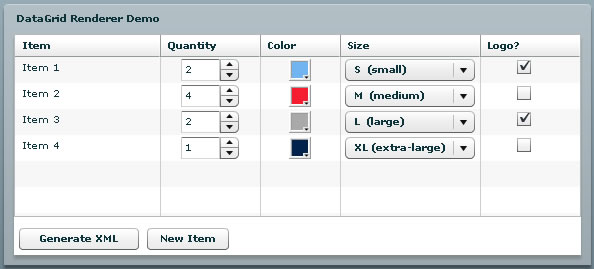
Voici un exemple d'utilisation du composant DataGrid en Flex 2 Flex 3 avec des ItemRenderer.
Chaque champ peut-être édité. Cet exemple montre l'utilisation de CheckBox, de ComboBox, de NumericStepper et de ColorPicker comme Renderer.
Voir les sources - View the sources
Tout est dans le code.
Les ItemRenderer de chaque colonne sont programmés en MXML.
Line Break
Author: Roelof (13 Articles) - Author Website
Roelof is a SAP Consultant specialized in Front-End development. In his spare free time he is either developing on the web, playing basketball, watching soccer or traveling. He is also the co-owner of Flex-Blog.com.
In the comments of our previous post about using the ProgressBar, one of our readers asked if a ProgressBar could be used inside a DataGrid.
This is, ofcourse, possible. So we decided to write an example about this.
There are a couple of things you need to know before we start:
First we create an ItemRenderer in a seperate ActionScript file (myProgressBar.as):
|
1 2 3 4 5 6 7 8 9 10 11 12 13 14 15 16 17 18 19 20 21 22 23 24 25 26 27 28 29 30 31 32 33 34 |
package { import mx.containers.HBox; import mx.controls.ProgressBar; import mx.controls.dataGridClasses.*; public class myProgressBar extends HBox //This should normally be extends ProgressBar, we are using HBox to have more control over the layout. { private var pb:ProgressBar; public function myProgressBar():void { //Create new ProgressBar Instance pb = new ProgressBar(); //Set some layout things pb.mode = "manual"; pb.percentWidth = 100; pb.labelPlacement = "center"; this.setStyle("verticalAlign","middle"); //Add ProgressBar as child addChild(pb); } override public function set data(value:Object):void { super.data = value; } override protected function updateDisplayList(unscaledWidth:Number, unscaledHeight:Number) : void{ super.updateDisplayList(unscaledWidth, unscaledHeight); pb.setProgress(data.loaded, data.total); } } } |
Then we will use this ItemRenderer inside the DataGrid column.
|
1 |
<mx:DataGridColumn itemRenderer="myProgressBar" dataField="progress" headerText="Progress" width="180" paddingLeft="5"/> |
To start the ‘fake’ ProgressBar download progress, we are using an Image as a Button inside the DataGrid.
|
1 2 3 4 5 6 7 8 9 10 |
<mx:DataGridColumn width="112" headerText="Download"> <mx:itemRenderer> <fx:Component> <mx:HBox horizontalAlign="center" verticalAlign="middle"> <s:Label text="{data.file}"/> <mx:Image buttonMode="true" toolTip="'Download'" click="outerDocument.downloadFile()" source="@Embed(source='images/down_alt.png')"/> </mx:HBox> </fx:Component> </mx:itemRenderer> </mx:DataGridColumn> |
Why use outerDocument?
Since the itemRenderer is within another Component, we need to use outerDocument to call a method inside your ‘main’ Component.
Next step was to implement the method downloadFile():
|
1 2 3 4 5 6 7 |
public function downloadFile():void{ //start timer var timer:Timer = new Timer(500); // add event listener timer.addEventListener(TimerEvent.TIMER, updateProgressBar); timer.start(); } |
Next, implement the eventListener. Inside the eventListener we need to make sure the DataGrid / ArrayCollection gets updated.
|
1 2 3 4 5 6 7 |
private function updateProgressBar(event:TimerEvent):void{ var myItem:Object; // Add a 'random' number to loaded. To fake the progress.. myDataGrid.selectedItem.loaded += Math.ceil(Math.random() * 5); //refesh arraycollection to refresh the datagrid myArrayCollection.refresh(); } |
Then you are done. Below you will find a working example. For the full source code either use Right Mouse Click -> View Source or scroll down.
Full Source Code:
ProgressBarInsideDatagridExample.mxml
|
1 2 3 4 5 6 7 8 9 10 11 12 13 14 15 16 17 18 19 20 21 22 23 24 25 26 27 28 29 30 31 32 33 34 35 36 37 38 39 40 41 42 43 44 45 46 47 48 49 50 51 52 53 54 55 56 57 58 59 60 61 62 63 64 65 66 67 68 69 70 71 72 |
<?xml version="1.0" encoding="utf-8"?> <s:Application xmlns:fx="http://ns.adobe.com/mxml/2009" xmlns:s="library://ns.adobe.com/flex/spark" xmlns:mx="library://ns.adobe.com/flex/halo" width="500" height="200" initialize="init();" viewSourceURL="srcview/index.html"> <fx:Script> <![CDATA[ import mx.collections.ArrayCollection; [Bindable]private var myArrayCollection:ArrayCollection; private function init():void { // Create instance of myArrayCollection myArrayCollection = new ArrayCollection; // Create new Object var obj:Object = new Object; obj.file = "File 1"; obj.total = 100; obj.loaded = 0; // Add object to myArrayCollection myArrayCollection.addItem(obj); obj = new Object; obj.file = "File 2"; obj.total = 100; obj.loaded = 0; // Add object to myArrayCollection myArrayCollection.addItem(obj); } public function downloadFile():void{ //start timer var timer:Timer = new Timer(500); // add event listener timer.addEventListener(TimerEvent.TIMER, updateProgressBar); timer.start(); } private function updateProgressBar(event:TimerEvent):void{ var myItem:Object; // Add a 'random' number to loaded. To fake the progress.. myDataGrid.selectedItem.loaded += Math.ceil(Math.random() * 5); //refesh arraycollection to refresh the datagrid myArrayCollection.refresh(); } ]]> </fx:Script> <fx:Declarations> <!-- Place non-visual elements (e.g., services, value objects) here --> </fx:Declarations> <mx:DataGrid id="myDataGrid" height="200" width="500" dataProvider="{myArrayCollection}"> <mx:columns> <mx:DataGridColumn width="112" headerText="Download"> <mx:itemRenderer> <fx:Component> <mx:HBox horizontalAlign="center" verticalAlign="middle"> <s:Label text="{data.file}"/> <mx:Image buttonMode="true" toolTip="'Download'" click="outerDocument.downloadFile()" source="@Embed(source='images/down_alt.png')"/> </mx:HBox> </fx:Component> </mx:itemRenderer> </mx:DataGridColumn> <mx:DataGridColumn itemRenderer="myProgressBar" dataField="progress" headerText="Progress" width="180" paddingLeft="5"/> </mx:columns> </mx:DataGrid> </s:Application> |
myProgressBar.as
|
1 2 3 4 5 6 7 8 9 10 11 12 13 14 15 16 17 18 19 20 21 22 23 24 25 26 27 28 29 30 31 32 33 34 |
package { import mx.containers.HBox; import mx.controls.ProgressBar; import mx.controls.dataGridClasses.*; public class myProgressBar extends HBox //This should normally be extends ProgressBar, we are using HBox to have more control over the layout. { private var pb:ProgressBar; public function myProgressBar():void { //Create new ProgressBar Instance pb = new ProgressBar(); //Set some layout things pb.mode = "manual"; pb.percentWidth = 100; pb.labelPlacement = "center"; this.setStyle("verticalAlign","middle"); //Add ProgressBar as child addChild(pb); } override public function set data(value:Object):void { super.data = value; } override protected function updateDisplayList(unscaledWidth:Number, unscaledHeight:Number) : void{ super.updateDisplayList(unscaledWidth, unscaledHeight); pb.setProgress(data.loaded, data.total); } } } |
I was trying to copy a canvas(UIComponent), but realize that it’s not a simple job as it looks like.
1. One can use the ObjectUtil.copy()..method to copy a simple object, but we can not use the same for UIComponent.
2. Secondly, one can use Bitmap to copy the Image type. Like…
public static function cloneImage(image:Image):Image
{
var clone:BitmapData = Bitmap(image.source).bitmapData.clone();
var bitmap:Bitmap = new Bitmap(clone);
var newImage:Image = new Image();
newImage.source = bitmap;
return newImage;
}
3.Thirdly, we can use the componentDescriptor to create a container
Like..
<?xml version=”1.0″ encoding=”utf-8″?>
<mx:Application xmlns:mx=”http://www.adobe.com/2006/mxml” layout=”horizontal”>
<mx:Script>
<![CDATA[
private function cloneButton_clickHandler (event:MouseEvent):void
{
var childDescriptors:Array = original.childDescriptors;
var descriptorsCount:int = childDescriptors.length;
for (var i:int; i < descriptorsCount; i++)
{
cloned.createComponentFromDescriptor(original.childDescriptors[i],
false);
}
cloned.validateNow();
}
]]>
</mx:Script>
<mx:Button label=”Clone Canvas” click=”cloneButton_clickHandler(event);” />
<mx:Canvas id=”original” width=”100″ height=”100″ borderStyle=”solid” >
<mx:Label text=”Some Label” />
<mx:ComboBox dataProvider=”{['data1', 'data2']}” bottom=”0″ />
</mx:Canvas>
<mx:Canvas id=”cloned” width=”100″ height=”100″ borderStyle=”solid” >
</mx:Canvas>
</mx:Application>
but, still there is a problem in the above method. It copy only the first level children.
For more usefulness we need to make RECURSIVE call to this method to copy each and every children it has which is really frustating…:(
4. I also tried to implement this by using Reflection API or taking a snapshot of the current view…
But, unfortunately flex does not have snapshot method. I guess we need to take help of ExternalInterface to implement the sanpshot method..
After going through all this I find that flex should have make this more simplify by providing an interface to clone any UICompoent.
Sorry to say, I guess flex is really lagging in this regard…
| Package | flash.printing |
| Class | public final class PaperSize |
| Inheritance | PaperSize Object |
| Language Version: | ActionScript 3.0 |
| Runtime Versions: | AIR 2 |
This class provides the available values for the
paperSize parameter of the PrintJob.selectPaperSize() method. Each constant represents a paper size that is used to print a page.
The following table shows the approximate size for each paper type. The size is approximate because there is some variation among printer drivers. For example, the width of A4 paper can be 595.0, 595.2, 595.22 or 595.28 points depending on the driver.
| Value | Size in points |
|---|---|
| A4 | 595 x 842 |
| A5 | 420 x 595 |
| A6 | 297 x 420 |
| CHOUKEI3GOU | 340 x 666 |
| CHOUKEI4GOU | 298 x 666 |
| ENV_10 | 297 x 684 |
| ENV_B5 | 499 x 709 |
| ENV_C5 | 459 x 649 |
| ENV_DL | 312 x 624 |
| ENV_MONARCH | 279 x 540 |
| ENV_PERSONAL | 261 x 468 |
| EXECUTIVE | 522 x 756 |
| FOLIO | 612 x 936 |
| JIS_B5 | 516 x 729 |
| LEGAL | 612 x 1008 |
| LETTER | 612 x 792 |
| STATEMENT | 396 x 612 |
Related API Elements
| Constant | Defined By | ||
|---|---|---|---|
| A4 : String = "a4"
[static] A4 |
PaperSize | ||
| A5 : String = "a5"
[static] A5 |
PaperSize | ||
| A6 : String = "a6"
[static] A6 |
PaperSize | ||
| CHOUKEI3GOU : String = "choukei3gou"
[static] Japanese choukei 3 gou (envelope) |
PaperSize | ||
| CHOUKEI4GOU : String = "choukei4gou"
[static] Japanese choukei 4 gou (envelope) |
PaperSize | ||
| ENV_10 : String = "env_10"
[static] Legal envelope |
PaperSize | ||
| ENV_B5 : String = "env_b5"
[static] B5 envelope |
PaperSize | ||
| ENV_C5 : String = "env_c5"
[static] C5 envelope |
PaperSize | ||
| ENV_DL : String = "env_dl"
[static] DL envelope |
PaperSize | ||
| ENV_MONARCH : String = "env_monarch"
[static] Monarch envelope |
PaperSize | ||
| ENV_PERSONAL : String = "env_personal"
[static] Personal envelope |
PaperSize | ||
| EXECUTIVE : String = "executive"
[static] Executive size |
PaperSize | ||
| FOLIO : String = "folio"
[static] Folio size |
PaperSize | ||
| JIS_B5 : String = "jis_b5"
[static] Japanese B5 |
PaperSize | ||
| LEGAL : String = "legal"
[static] Traditional legal size |
PaperSize | ||
| LETTER : String = "letter"
[static] Traditional letter size |
PaperSize | ||
| STATEMENT : String = "statement"
[static] Statement size |
PaperSize | ||
A4 |
Constant |
A5 |
Constant |
A6 |
Constant |
CHOUKEI3GOU |
Constant |
public static const CHOUKEI3GOU:String = "choukei3gou"
| Language Version: | ActionScript 3.0 |
| Runtime Versions: | AIR 2 |
Japanese choukei 3 gou (envelope)
CHOUKEI4GOU |
Constant |
public static const CHOUKEI4GOU:String = "choukei4gou"
| Language Version: | ActionScript 3.0 |
| Runtime Versions: | AIR 2 |
Japanese choukei 4 gou (envelope)
ENV_10 |
Constant |
public static const ENV_10:String = "env_10"
| Language Version: | ActionScript 3.0 |
| Runtime Versions: | AIR 2 |
Legal envelope
ENV_B5 |
Constant |
public static const ENV_B5:String = "env_b5"
| Language Version: | ActionScript 3.0 |
| Runtime Versions: | AIR 2 |
B5 envelope
ENV_C5 |
Constant |
public static const ENV_C5:String = "env_c5"
| Language Version: | ActionScript 3.0 |
| Runtime Versions: | AIR 2 |
C5 envelope
ENV_DL |
Constant |
public static const ENV_DL:String = "env_dl"
| Language Version: | ActionScript 3.0 |
| Runtime Versions: | AIR 2 |
DL envelope
ENV_MONARCH |
Constant |
public static const ENV_MONARCH:String = "env_monarch"
| Language Version: | ActionScript 3.0 |
| Runtime Versions: | AIR 2 |
Monarch envelope
ENV_PERSONAL |
Constant |
public static const ENV_PERSONAL:String = "env_personal"
| Language Version: | ActionScript 3.0 |
| Runtime Versions: | AIR 2 |
Personal envelope
EXECUTIVE |
Constant |
public static const EXECUTIVE:String = "executive"
| Language Version: | ActionScript 3.0 |
| Runtime Versions: | AIR 2 |
Executive size
FOLIO |
Constant |
public static const FOLIO:String = "folio"
| Language Version: | ActionScript 3.0 |
| Runtime Versions: | AIR 2 |
Folio size
JIS_B5 |
Constant |
public static const JIS_B5:String = "jis_b5"
| Language Version: | ActionScript 3.0 |
| Runtime Versions: | AIR 2 |
Japanese B5
LEGAL |
Constant |
public static const LEGAL:String = "legal"
| Language Version: | ActionScript 3.0 |
| Runtime Versions: | AIR 2 |
Traditional legal size
LETTER |
Constant |
public static const LETTER:String = "letter"
| Language Version: | ActionScript 3.0 |
| Runtime Versions: | AIR 2 |
Traditional letter size
STATEMENT |
Constant |
public static const STATEMENT:String = "statement"
| Language Version: | ActionScript 3.0 |
| Runtime Versions: | AIR 2 |
Statement size
Adobe® Flash® Player and Adobe® AIR™ can communicate with an operating system’s printing interface so that you can pass pages to the print spooler. Each page Flash Player or AIR sends to the spooler can contain content that is visible, dynamic, or offscreen to the user, including database values and dynamic text. Additionally, Flash Player and AIR set the properties of the flash.printing.PrintJob class based on a user’s printer settings, so that you can format pages appropriately.
This chapter details strategies for using the flash.printing.PrintJob class methods and properties to create a print job, read a user’s print settings, and make adjustments to a print job based on feedback from Flash Player or AIR and the user’s operating system.