https://community.hortonworks.com/content/kbentry/3160/update-nifi-flow-on-the-fly-via-api.html
409 Conflict(충돌)
다른 요청이나 서버의 구성과 충돌이 있음을 나타냅니다.
충돌에 대한 정보는 응답되는 데이터의 일부로 반환됩니다. 이 코드는 사용자가 충돌을 해결하고 요구를 재전송할 수 있을 것으로 기대할 수 있는 상황에서만 사용할 수 있습니다. 응답 본문은 사용자가 충돌의 원인을 인지할 수 있도록 충분한 정보를 포함해야 합니다. 이상적으로는 응답 엔터티가 사용자 또는 사용자 에이전트가 문제를 해결할 수 있을 정도의 충분한 정보를 포함할 수 있을 것입니다. 그러나 가능하지 않을 수도 있으며 필수 사항은 아닙니다.
충돌은 PUT 요구에 대한 응답으로 발생할 가능성이 높습니다. 버전 관리를 사용하고 있고 PUT 요구를 하는 엔터티가 이전 요구(제 3 자)가 작성한 요구와 충돌되는 자원에 대한 변경 사항을 포함하고 있다면 서버는 409 응답을 사용하여 요구를 완료할 수 없음을 표시해야 합니다. 이 경우 응답 엔터티는 응답 Content-Type이 규정한 형식으로 두 버전 사이의 차이점 목록을 포함해야 합니다.
409 Conflict

   The 409 (Conflict) status code indicates that the request could not
   be completed due to a conflict with the current state of the target
   resource.  This code is used in situations where the user might be
   able to resolve the conflict and resubmit the request.  The server
   SHOULD generate a payload that includes enough information for a user
   to recognize the source of the conflict.

   Conflicts are most likely to occur in response to a PUT request.  For
   example, if versioning were being used and the representation being
   PUT included changes to a resource that conflict with those made by
   an earlier (third-party) request, the origin server might use a 409
   response to indicate that it can't complete the request.  In this
   case, the response representation would likely contain information
   useful for merging the differences based on the revision history.
[전지구 좌표계]
전세계를 한번에 나타내야 할 때 많이 쓰이는 좌표계들입니다.
*WGS84 경위도: GPS가 사용하는 좌표계
EPSG:4326, EPSG:4166 (Korean 1995)
+proj=longlat +ellps=WGS84 +datum=WGS84 +no_defs
*Bessel 1841 경위도: 한국과 일본에 잘 맞는 지역타원체를 사용한 좌표계
EPSG:4004, EPSG:4162 (Korean 1985)
+proj=longlat +ellps=bessel +no_defs +towgs84=-115.80,474.99,674.11,1.16,-2.31,-1.63,6.43
*GRS80 경위도: WGS84와 거의 유사
EPSG:4019, EPSG:4737 (Korean 2000)
+proj=longlat +ellps=GRS80 +no_defs
*Google Mercator: 구글지도/빙지도/야후지도/OSM 등 에서 사용중인 좌표계
EPSG:3857(공식), EPSG:900913(통칭)
+proj=merc +a=6378137 +b=6378137 +lat_ts=0.0 +lon_0=0.0 +x_0=0.0 +y_0=0 +k=1.0 +units=m +nadgrids=@null +no_defs
| var degrees2meters = function(lon,lat) { | |
| var x = lon * 20037508.34 / 180; | |
| var y = Math.log(Math.tan((90 + lat) * Math.PI / 360)) / (Math.PI / 180); | |
| y = y * 20037508.34 / 180; | |
| return [x, y] | |
| } | |
| x= -77.035974 | |
| y = 38.898717 | |
| console.log(degrees2meters(x,y)) | |
1 2 3 4 5 6 | <?xml version="1.0" encoding="ISO-8859-1"?> <!DOCTYPE jboss-web PUBLIC "-//JBoss//DTD Web Application 2.3V2//EN" "http://www.jboss.org/j2ee/dtd/jboss-web_4_0.dtd"> <jboss-web> <context-root allowLinking="true">/</context-root> <symbolic-linking-enabled>true</symbolic-linking-enabled> </jboss-web> | cs |
spring boot 기반 JdbcTemplate
1 2 3 4 5 | spring.datasource.driver-class-name=com.tmax.tibero.jdbc.TbDriver spring.datasource.url=jdbc:tibero:thin:@8.8.8.8.:8629:tibero spring.datasource.username=id spring.datasource.password=pw | cs |
1 2 3 4 5 6 7 8 9 10 11 12 13 14 15 16 17 18 19 20 21 22 23 24 25 26 27 28 29 30 31 32 33 34 35 36 37 38 39 40 41 42 43 44 45 46 47 48 49 50 51 52 53 54 55 56 57 58 59 | package com.example; import java.io.BufferedReader; import java.io.IOException; import java.io.InputStreamReader; import java.sql.PreparedStatement; import java.sql.SQLException; import org.springframework.boot.SpringApplication; import org.springframework.boot.autoconfigure.SpringBootApplication; import org.springframework.core.io.ClassPathResource; import org.springframework.core.io.Resource; import org.springframework.jdbc.core.JdbcTemplate; import org.springframework.jdbc.core.PreparedStatementSetter; @SpringBootApplication public class DemoApplication { private static JdbcTemplate jdbcTemplate; private static StringBuffer INSERT_TMP_TBL_MEMBER = new StringBuffer(); public DemoApplication(JdbcTemplate _JdbcTemplate) { // TODO Auto-generated constructor stub DemoApplication.jdbcTemplate = _JdbcTemplate; INSERT_TMP_TBL_MEMBER.append("INSERT INTO TMP_TBL_MEMBER (C_NO,C_BIRTH,C_PHONE,C_PHONE2,C_EMAIL,C_NAME) VALUES(?,?,?,?,?,?)"); } public static void main(String[] args) throws IOException{ SpringApplication.run(DemoApplication.class, args); Resource resource = new ClassPathResource("TBL_MEMBER.txt"); BufferedReader reader = new BufferedReader(new InputStreamReader(resource.getInputStream(),"euc-kr")); String tmpStr; while ((tmpStr = reader.readLine()) != null) { // C_NO,C_BIRTH,C_PHONE,C_PHONE2,C_EMAIL,C_NAME String[] params = tmpStr.split(","); if(params.length == 6){ INSERT_TB_FILE_MANAGE(params); }else{ System.out.println(params.length+":"+params.toString()); } } } private static void INSERT_TB_FILE_MANAGE(String[] params) { jdbcTemplate.update(INSERT_TMP_TBL_MEMBER.toString(), new PreparedStatementSetter() { @Override public void setValues(PreparedStatement preparedStatement) throws SQLException { // TODO Auto-generated method stub preparedStatement.setString(1, params[0] == null ? "" : params[0]); preparedStatement.setString(2, params[1] == null ? "" : params[1]); preparedStatement.setString(3, params[2] == null ? "" : params[2]); preparedStatement.setString(4, params[3] == null ? "" : params[3]); preparedStatement.setString(5, params[4] == null ? "" : params[4]); preparedStatement.setString(6, params[5] == null ? "" : params[5]); } }); } } | cs |
Issue
- If Weld is not forced to use JSF Version 1.2, it picks the 2.1 Version (despite the declaration of Mojarra-1.2 in web.xml) and the following error occurs:
14:30:27,385 ERROR [org.apache.catalina.core.ContainerBase.[jboss.web].[default-host].[/CDI_JSF_WebDemo]] (ServerService Thread Pool -- 63) JBWEB000287: Exception sending context initialized event to listener instance of class com.sun.faces.config.ConfigureListener: com.sun.faces.config.ConfigurationException: CONFIGURATION FAILED! org.jboss.as.weld.webtier.jsf.WeldApplicationFactory
    at com.sun.faces.config.ConfigManager.initialize(ConfigManager.java:215) [jsf-impl-1.2_15-b01-redhat-3.jar:1.2_15-b01-redhat-3]
    at com.sun.faces.config.ConfigureListener.contextInitialized(ConfigureListener.java:200) [jsf-impl-1.2_15-b01-redhat-3.jar:1.2_15-b01-redhat-3]
    at org.apache.catalina.core.StandardContext.contextListenerStart(StandardContext.java:3339) [jbossweb-7.2.0.Final-redhat-1.jar:7.2.0.Final-redhat-1]
    at org.apache.catalina.core.StandardContext.start(StandardContext.java:3777) [jbossweb-7.2.0.Final-redhat-1.jar:7.2.0.Final-redhat-1]
    at org.jboss.as.web.deployment.WebDeploymentService.doStart(WebDeploymentService.java:156) [jboss-as-web-7.2.0.Final-redhat-8.jar:7.2.0.Final-redhat-8]
    at org.jboss.as.web.deployment.WebDeploymentService.access$000(WebDeploymentService.java:60) [jboss-as-web-7.2.0.Final-redhat-8.jar:7.2.0.Final-redhat-8]
    at org.jboss.as.web.deployment.WebDeploymentService$1.run(WebDeploymentService.java:93) [jboss-as-web-7.2.0.Final-redhat-8.jar:7.2.0.Final-redhat-8]
    at java.util.concurrent.Executors$RunnableAdapter.call(Executors.java:471) [rt.jar:1.7.0_65]
    at java.util.concurrent.FutureTask.run(FutureTask.java:262) [rt.jar:1.7.0_65]
    at java.util.concurrent.ThreadPoolExecutor.runWorker(ThreadPoolExecutor.java:1145) [rt.jar:1.7.0_65]
    at java.util.concurrent.ThreadPoolExecutor$Worker.run(ThreadPoolExecutor.java:615) [rt.jar:1.7.0_65]
    at java.lang.Thread.run(Thread.java:745) [rt.jar:1.7.0_65]
    at org.jboss.threads.JBossThread.run(JBossThread.java:122)
Caused by: java.lang.InstantiationException: org.jboss.as.weld.webtier.jsf.WeldApplicationFactory
    at java.lang.Class.newInstance(Class.java:359) [rt.jar:1.7.0_65]
    at javax.faces.FactoryFinder.getImplGivenPreviousImpl(FactoryFinder.java:537) [jsf-api-1.2_15-b01-redhat-3.jar:1.2_15-b01-redhat-3]
    at javax.faces.FactoryFinder.getImplementationInstance(FactoryFinder.java:405) [jsf-api-1.2_15-b01-redhat-3.jar:1.2_15-b01-redhat-3]
    at javax.faces.FactoryFinder.access$400(FactoryFinder.java:135) [jsf-api-1.2_15-b01-redhat-3.jar:1.2_15-b01-redhat-3]
    at javax.faces.FactoryFinder$FactoryManager.getFactory(FactoryFinder.java:717) [jsf-api-1.2_15-b01-redhat-3.jar:1.2_15-b01-redhat-3]
    at javax.faces.FactoryFinder.getFactory(FactoryFinder.java:239) [jsf-api-1.2_15-b01-redhat-3.jar:1.2_15-b01-redhat-3]
    at com.sun.faces.config.processor.FactoryConfigProcessor.verifyFactoriesExist(FactoryConfigProcessor.java:187) [jsf-impl-1.2_15-b01-redhat-3.jar:1.2_15-b01-redhat-3]
    at com.sun.faces.config.processor.FactoryConfigProcessor.process(FactoryConfigProcessor.java:132) [jsf-impl-1.2_15-b01-redhat-3.jar:1.2_15-b01-redhat-3]
    at com.sun.faces.config.ConfigManager.initialize(ConfigManager.java:205) [jsf-impl-1.2_15-b01-redhat-3.jar:1.2_15-b01-redhat-3]
    ... 12 more

14:30:27,388 ERROR [org.apache.catalina.core] (ServerService Thread Pool -- 63) JBWEB001103: Error detected during context /CDI_JSF_WebDemo start, will stop it
14:30:27,395 ERROR [org.jboss.msc.service.fail] (ServerService Thread Pool -- 63) MSC000001: Failed to start service jboss.web.deployment.default-host./CDI_JSF_WebDemo: org.jboss.msc.service.StartException in service jboss.web.deployment.default-host./CDI_JSF_WebDemo: org.jboss.msc.service.StartException in anonymous service: JBAS018040: Failed to start context
    at org.jboss.as.web.deployment.WebDeploymentService$1.run(WebDeploymentService.java:96)
    at java.util.concurrent.Executors$RunnableAdapter.call(Executors.java:471) [rt.jar:1.7.0_65]
    at java.util.concurrent.FutureTask.run(FutureTask.java:262) [rt.jar:1.7.0_65]
    at java.util.concurrent.ThreadPoolExecutor.runWorker(ThreadPoolExecutor.java:1145) [rt.jar:1.7.0_65]
    at java.util.concurrent.ThreadPoolExecutor$Worker.run(ThreadPoolExecutor.java:615) [rt.jar:1.7.0_65]
    at java.lang.Thread.run(Thread.java:745) [rt.jar:1.7.0_65]
    at org.jboss.threads.JBossThread.run(JBossThread.java:122)
Caused by: org.jboss.msc.service.StartException in anonymous service: JBAS018040: Failed to start context
    at org.jboss.as.web.deployment.WebDeploymentService.doStart(WebDeploymentService.java:161)
    at org.jboss.as.web.deployment.WebDeploymentService.access$000(WebDeploymentService.java:60)
    at org.jboss.as.web.deployment.WebDeploymentService$1.run(WebDeploymentService.java:93)
    ... 6 more

14:30:27,604 ERROR [org.jboss.as.server] (DeploymentScanner-threads - 2) JBAS015870: Deploy of deployment "CDI_JSF_WebDemo.war" was rolled back with the following failure message:
{"JBAS014671: Failed services" => {"jboss.web.deployment.default-host./CDI_JSF_WebDemo" => "org.jboss.msc.service.StartException in service jboss.web.deployment.default-host./CDI_JSF_WebDemo: org.jboss.msc.service.StartException in anonymous service: JBAS018040: Failed to start context
    Caused by: org.jboss.msc.service.StartException in anonymous service: JBAS018040: Failed to start context"}}
- If the following Weld modules in JBoss are modified to use JSF Version 1.2, the error does not appear and everything works fine:
"jboss-eap-6.1.0/modules/system/layers/base/org/jboss/as/weld/main/module.xml"
"jboss-eap-6.1.0/modules/system/layers/base/org/jboss/weld/core/main/module.xml"
  <dependencies>
     ...
     <module name="javax.faces.api" slot="1.2"/>
     ...
  </dependencies>
- But we get stuck if we try to achieve the same with
"META-INF/jboss-deployment-structure.xml". The error appears again:
<jboss-deployment-structure>
    <deployment>
        <exclusions>
            <module name="javax.faces.api"/>
            <module name="com.sun.jsf-impl"/>
        </exclusions>
        <dependencies>
            <module name="javax.faces.api" slot="1.2"/>
            <module name="com.sun.jsf-impl" slot="1.2"/>
        </dependencies>
    </deployment>
</jboss-deployment-structure>
- How to use the
"jboss-deployment-structure.xml"to achieve the same effect as modifying the module dependency definitions? - Is there a "Per Application" solution available, because changing the whole JBoss instance to use JSF 1.2 will cause problems with our JSF 2.0 Applications.
spring boot 기반 restful 방식 개발시 jsp 컴파일 안되는 문제
Deploying a WAR in an Old (Servlet 2.5) Container
Spring Boot uses Servlet 3.0 APIs to initialize the ServletContext (register Servlets etc.) so you can’t use the same application out of the box in a Servlet 2.5 container. It is however possible to run a Spring Boot application on an older container with some special tools. If you includeorg.springframework.boot:spring-boot-legacy as a dependency (maintained separately to the core of Spring Boot and currently available at 1.0.0.RELEASE), all you should need to do is create a web.xml and declare a context listener to create the application context and your filters and servlets. The context listener is a special purpose one for Spring Boot, but the rest of it is normal for a Spring application in Servlet 2.5. Example:
<?xml version="1.0" encoding="UTF-8"?>
<web-app version="2.5" xmlns="http://java.sun.com/xml/ns/javaee"
    xmlns:xsi="http://www.w3.org/2001/XMLSchema-instance"
    xsi:schemaLocation="http://java.sun.com/xml/ns/javaee http://java.sun.com/xml/ns/javaee/web-app_2_5.xsd">

    <context-param>
        <param-name>contextConfigLocation</param-name>
        <param-value>demo.Application</param-value>
    </context-param>

    <listener>
        <listener-class>org.springframework.boot.legacy.context.web.SpringBootContextLoaderListener</listener-class>
    </listener>

    <filter>
        <filter-name>metricFilter</filter-name>
        <filter-class>org.springframework.web.filter.DelegatingFilterProxy</filter-class>
    </filter>

    <filter-mapping>
        <filter-name>metricFilter</filter-name>
        <url-pattern>/*</url-pattern>
    </filter-mapping>

    <servlet>
        <servlet-name>appServlet</servlet-name>
        <servlet-class>org.springframework.web.servlet.DispatcherServlet</servlet-class>
        <init-param>
            <param-name>contextAttribute</param-name>
            <param-value>org.springframework.web.context.WebApplicationContext.ROOT</param-value>
        </init-param>
        <load-on-startup>1</load-on-startup>
    </servlet>

    <servlet-mapping>
        <servlet-name>appServlet</servlet-name>
        <url-pattern>/</url-pattern>
    </servlet-mapping>

</web-app>
In this example we are using a single application context (the one created by the context listener) and attaching it to the DispatcherServlet using an init parameter. This is normal in a Spring Boot application (you normally only have one application context).
Spring 4 MVC ContentNegotiatingViewResolver example
This article demonstrates supporting multiple output formats for your Spring 4 MVC application using Spring’s ContentNegotiatingViewResolver. We will be generating application output in XML, JSON, PDF, XLS and HTML format, all using Annotation based configuration.
ContentNegotiatingViewResolver is an implementation of ViewResolver, which uses the requested media type (based on filetype extension, URL parameter specifying type of output format or accept header) to select a suitable View for a request. ContentNegotiatingViewResolver does not resolve view by itself but delegates to other ViewResolver you can configure to handle specific views(XML,JSON,PDF,XLS,HTML,..).
Other interesting posts you may like
- Secure Spring REST API using OAuth2
- AngularJS+Spring Security using Basic Authentication
- Secure Spring REST API using Basic Authentication
- Spring 4 MVC+JPA2+Hibernate Many-to-many Example
- Spring 4 Caching Annotations Tutorial
- Spring 4 Cache Tutorial with EhCache
- Spring 4 Email Template Library Example
- Spring 4 Email With Attachment Tutorial
- Spring 4 Email Integration Tutorial
- Spring MVC 4+JMS+ActiveMQ Integration Example
- Spring 4+JMS+ActiveMQ @JmsLister @EnableJms Example
- Spring 4+JMS+ActiveMQ Integration Example
- Spring MVC 4+Apache Tiles 3 Integration Example
- Spring MVC 4+Spring Security 4 + Hibernate Integration Example
- Spring MVC 4+AngularJS Example
- Spring MVC 4+AngularJS Routing with ngRoute Example
- Spring MVC 4+AngularJS Routing with UI-Router Example
- Spring MVC 4+Hibernate 4+MySQL+Maven integration example
- Spring Security 4 Custom Login Form Annotation+XML Example
- Spring Security 4 Hello World Annotation+XML Example
- Hibernate MySQL Maven Hello World Example (Annotation)
- TestNG Hello World Example
- JAXB2 Helloworld Example
- Spring Batch- Read an XML file and write to MySQL Database
Following technologies being used:
- Spring 4.0.6.RELEASE
- jackson-databind 2.4.1.3
- jackson-annotations 2.4.1
- lowagie itext 4.2.1
- Apache POI 3.10-beta2
- Maven 3
- JDK 1.6
- Tomcat 7.0.54
- Eclipse JUNO Service Release 2
Let’s begin.
This article demonstrates supporting multiple output formats for your Spring 4 MVC application using Spring’s ContentNegotiatingViewResolver. We will be generating application output in XML, JSON, PDF, XLS and HTML format, all using Annotation based configuration.
ContentNegotiatingViewResolver is an implementation of ViewResolver, which uses the requested media type (based on filetype extension, URL parameter specifying type of output format or accept header) to select a suitable View for a request. ContentNegotiatingViewResolver does not resolve view by itself but delegates to other ViewResolver you can configure to handle specific views(XML,JSON,PDF,XLS,HTML,..).
- Secure Spring REST API using OAuth2
- AngularJS+Spring Security using Basic Authentication
- Secure Spring REST API using Basic Authentication
- Spring 4 MVC+JPA2+Hibernate Many-to-many Example
- Spring 4 Caching Annotations Tutorial
- Spring 4 Cache Tutorial with EhCache
- Spring 4 Email Template Library Example
- Spring 4 Email With Attachment Tutorial
- Spring 4 Email Integration Tutorial
- Spring MVC 4+JMS+ActiveMQ Integration Example
- Spring 4+JMS+ActiveMQ @JmsLister @EnableJms Example
- Spring 4+JMS+ActiveMQ Integration Example
- Spring MVC 4+Apache Tiles 3 Integration Example
- Spring MVC 4+Spring Security 4 + Hibernate Integration Example
- Spring MVC 4+AngularJS Example
- Spring MVC 4+AngularJS Routing with ngRoute Example
- Spring MVC 4+AngularJS Routing with UI-Router Example
- Spring MVC 4+Hibernate 4+MySQL+Maven integration example
- Spring Security 4 Custom Login Form Annotation+XML Example
- Spring Security 4 Hello World Annotation+XML Example
- Hibernate MySQL Maven Hello World Example (Annotation)
- TestNG Hello World Example
- JAXB2 Helloworld Example
- Spring Batch- Read an XML file and write to MySQL Database
Following technologies being used:
- Spring 4.0.6.RELEASE
- jackson-databind 2.4.1.3
- jackson-annotations 2.4.1
- lowagie itext 4.2.1
- Apache POI 3.10-beta2
- Maven 3
- JDK 1.6
- Tomcat 7.0.54
- Eclipse JUNO Service Release 2
Let’s begin.
Step 1: Create the directory structure
Following will be the final directory structure for this example:
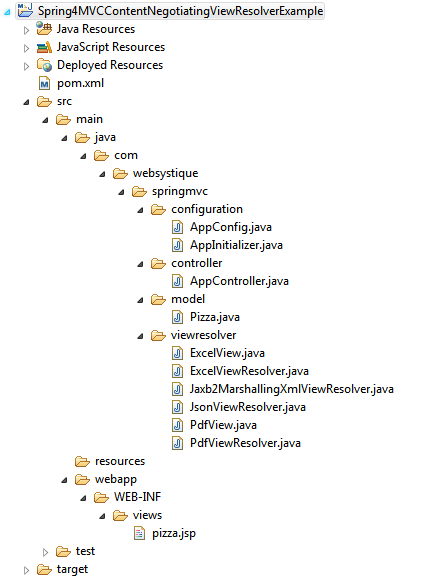
We will be using Spring Java Configuration(Annotations). Now let’s add/update the content mentioned in above project structure.
Following will be the final directory structure for this example:
We will be using Spring Java Configuration(Annotations). Now let’s add/update the content mentioned in above project structure.
Step 2: Update pom.xml with required dependencies
<?xml version="1.0"?><project <modelVersion>4.0.0</modelVersion> <groupId>com.websystique.springmvc</groupId> <artifactId>Spring4MVCContentNegotiatingViewResolverExample</artifactId> <packaging>war</packaging> <version>1.0.0</version> <name>Spring4MVCContentNegotiatingViewResolverExample</name> <properties> <springframework.version>4.0.6.RELEASE</springframework.version> </properties> <dependencies> <dependency> <groupId>org.springframework</groupId> <artifactId>spring-core</artifactId> <version>${springframework.version}</version> </dependency> <dependency> <groupId>org.springframework</groupId> <artifactId>spring-web</artifactId> <version>${springframework.version}</version> </dependency> <dependency> <groupId>org.springframework</groupId> <artifactId>spring-webmvc</artifactId> <version>${springframework.version}</version> </dependency> <!-- Needed for XML View (with JAXB2) --> <dependency> <groupId>org.springframework</groupId> <artifactId>spring-oxm</artifactId> <version>${springframework.version}</version> </dependency> <!-- Needed for JSON View --> <dependency> <groupId>com.fasterxml.jackson.core</groupId> <artifactId>jackson-databind</artifactId> <version>2.4.1.3</version> </dependency> <dependency> <groupId>com.fasterxml.jackson.core</groupId> <artifactId>jackson-annotations</artifactId> <version>2.4.1</version> </dependency> <!-- Needed for PDF View --> <dependency> <groupId>com.lowagie</groupId> <artifactId>itext</artifactId> <version>4.2.1</version> </dependency> <!-- Needed for XLS View --> <dependency> <groupId>org.apache.poi</groupId> <artifactId>poi</artifactId> <version>3.10-beta2</version> </dependency> <!-- Servlet dependencies --> <dependency> <groupId>javax.servlet</groupId> <artifactId>javax.servlet-api</artifactId> <version>3.1.0</version> </dependency> <dependency> <groupId>javax.servlet</groupId> <artifactId>jstl</artifactId> <version>1.2</version> </dependency> <dependency> <groupId>javax.servlet.jsp</groupId> <artifactId>javax.servlet.jsp-api</artifactId> <version>2.3.1</version> </dependency> </dependencies> <build> <pluginManagement> <plugins> <plugin> <groupId>org.apache.maven.plugins</groupId> <artifactId>maven-compiler-plugin</artifactId> <version>3.2</version> <configuration> <source>1.6</source> <target>1.6</target> </configuration> </plugin> <plugin> <groupId>org.apache.maven.plugins</groupId> <artifactId>maven-war-plugin</artifactId> <version>2.4</version> <configuration> <warSourceDirectory>src/main/webapp</warSourceDirectory> <warName>Spring4MVCContentNegotiatingViewResolverExample</warName> <failOnMissingWebXml>false</failOnMissingWebXml> </configuration> </plugin> </plugins> </pluginManagement> <finalName>Spring4MVCContentNegotiatingViewResolverExample</finalName> </build></project>
spring-oxm is included to support XML output generation (using JAXB2). jackson-databind &jackson-annotations provide JSON output support. itext provide PDF generation library to support PDF output. Apache POI will help producing XLS output format.
<?xml version="1.0"?><project <modelVersion>4.0.0</modelVersion> <groupId>com.websystique.springmvc</groupId> <artifactId>Spring4MVCContentNegotiatingViewResolverExample</artifactId> <packaging>war</packaging> <version>1.0.0</version> <name>Spring4MVCContentNegotiatingViewResolverExample</name> <properties> <springframework.version>4.0.6.RELEASE</springframework.version> </properties> <dependencies> <dependency> <groupId>org.springframework</groupId> <artifactId>spring-core</artifactId> <version>${springframework.version}</version> </dependency> <dependency> <groupId>org.springframework</groupId> <artifactId>spring-web</artifactId> <version>${springframework.version}</version> </dependency> <dependency> <groupId>org.springframework</groupId> <artifactId>spring-webmvc</artifactId> <version>${springframework.version}</version> </dependency> <!-- Needed for XML View (with JAXB2) --> <dependency> <groupId>org.springframework</groupId> <artifactId>spring-oxm</artifactId> <version>${springframework.version}</version> </dependency> <!-- Needed for JSON View --> <dependency> <groupId>com.fasterxml.jackson.core</groupId> <artifactId>jackson-databind</artifactId> <version>2.4.1.3</version> </dependency> <dependency> <groupId>com.fasterxml.jackson.core</groupId> <artifactId>jackson-annotations</artifactId> <version>2.4.1</version> </dependency> <!-- Needed for PDF View --> <dependency> <groupId>com.lowagie</groupId> <artifactId>itext</artifactId> <version>4.2.1</version> </dependency> <!-- Needed for XLS View --> <dependency> <groupId>org.apache.poi</groupId> <artifactId>poi</artifactId> <version>3.10-beta2</version> </dependency> <!-- Servlet dependencies --> <dependency> <groupId>javax.servlet</groupId> <artifactId>javax.servlet-api</artifactId> <version>3.1.0</version> </dependency> <dependency> <groupId>javax.servlet</groupId> <artifactId>jstl</artifactId> <version>1.2</version> </dependency> <dependency> <groupId>javax.servlet.jsp</groupId> <artifactId>javax.servlet.jsp-api</artifactId> <version>2.3.1</version> </dependency> </dependencies> <build> <pluginManagement> <plugins> <plugin> <groupId>org.apache.maven.plugins</groupId> <artifactId>maven-compiler-plugin</artifactId> <version>3.2</version> <configuration> <source>1.6</source> <target>1.6</target> </configuration> </plugin> <plugin> <groupId>org.apache.maven.plugins</groupId> <artifactId>maven-war-plugin</artifactId> <version>2.4</version> <configuration> <warSourceDirectory>src/main/webapp</warSourceDirectory> <warName>Spring4MVCContentNegotiatingViewResolverExample</warName> <failOnMissingWebXml>false</failOnMissingWebXml> </configuration> </plugin> </plugins> </pluginManagement> <finalName>Spring4MVCContentNegotiatingViewResolverExample</finalName> </build></project> |
spring-oxm is included to support XML output generation (using JAXB2). jackson-databind &jackson-annotations provide JSON output support. itext provide PDF generation library to support PDF output. Apache POI will help producing XLS output format.
Step 3: Create Spring Configuration Class
com.websystique.springmvc.configuration.AppConfig
package com.websystique.springmvc.configuration; import java.util.ArrayList;import java.util.List; import org.springframework.context.annotation.Bean;import org.springframework.context.annotation.ComponentScan;import org.springframework.context.annotation.Configuration;import org.springframework.http.MediaType;import org.springframework.oxm.jaxb.Jaxb2Marshaller;import org.springframework.web.accept.ContentNegotiationManager;import org.springframework.web.servlet.ViewResolver;import org.springframework.web.servlet.config.annotation.ContentNegotiationConfigurer;import org.springframework.web.servlet.config.annotation.EnableWebMvc;import org.springframework.web.servlet.config.annotation.WebMvcConfigurerAdapter;import org.springframework.web.servlet.view.ContentNegotiatingViewResolver;import org.springframework.web.servlet.view.InternalResourceViewResolver;import org.springframework.web.servlet.view.JstlView; import com.websystique.springmvc.model.Pizza;import com.websystique.springmvc.viewresolver.ExcelViewResolver;import com.websystique.springmvc.viewresolver.JsonViewResolver;import com.websystique.springmvc.viewresolver.Jaxb2MarshallingXmlViewResolver;import com.websystique.springmvc.viewresolver.PdfViewResolver; @Configuration@EnableWebMvc@ComponentScan(basePackages = "com.websystique.springmvc")public class AppConfig extends WebMvcConfigurerAdapter { /* * Configure ContentNegotiationManager */ @Override public void configureContentNegotiation(ContentNegotiationConfigurer configurer) { configurer.ignoreAcceptHeader(true).defaultContentType( MediaType.TEXT_HTML); } /* * Configure ContentNegotiatingViewResolver */ @Bean public ViewResolver contentNegotiatingViewResolver(ContentNegotiationManager manager) { ContentNegotiatingViewResolver resolver = new ContentNegotiatingViewResolver(); resolver.setContentNegotiationManager(manager); // Define all possible view resolvers List<ViewResolver> resolvers = new ArrayList<ViewResolver>(); resolvers.add(jaxb2MarshallingXmlViewResolver()); resolvers.add(jsonViewResolver()); resolvers.add(jspViewResolver()); resolvers.add(pdfViewResolver()); resolvers.add(excelViewResolver()); resolver.setViewResolvers(resolvers); return resolver; } /* * Configure View resolver to provide XML output Uses JAXB2 marshaller to * marshall/unmarshall POJO's (with JAXB annotations) to XML */ @Bean public ViewResolver jaxb2MarshallingXmlViewResolver() { Jaxb2Marshaller marshaller = new Jaxb2Marshaller(); marshaller.setClassesToBeBound(Pizza.class); return new Jaxb2MarshallingXmlViewResolver(marshaller); } /* * Configure View resolver to provide JSON output using JACKSON library to * convert object in JSON format. */ @Bean public ViewResolver jsonViewResolver() { return new JsonViewResolver(); } /* * Configure View resolver to provide PDF output using lowagie pdf library to * generate PDF output for an object content */ @Bean public ViewResolver pdfViewResolver() { return new PdfViewResolver(); } /* * Configure View resolver to provide XLS output using Apache POI library to * generate XLS output for an object content */ @Bean public ViewResolver excelViewResolver() { return new ExcelViewResolver(); } /* * Configure View resolver to provide HTML output This is the default format * in absence of any type suffix. */ @Bean public ViewResolver jspViewResolver() { InternalResourceViewResolver viewResolver = new InternalResourceViewResolver(); viewResolver.setViewClass(JstlView.class); viewResolver.setPrefix("/WEB-INF/views/"); viewResolver.setSuffix(".jsp"); return viewResolver; } }
Let’s discuss above class in details :
First step is to create the ContentNegotiationManager which is used to determine the requested media types of a request by delegating to a list of ContentNegotiationStrategy instances. By defaultPathExtensionContentNegotiationStrategy is consulted (which uses the URL extension e.g. .xls, .pdf,.json..) , followed by ParameterContentNegotiationStrategy (which uses the request parameter ‘format=xls’ e.g.), followed by HeaderContentNegotiationStrategy (which uses HTTP Accept Headers).
public void configureContentNegotiation(ContentNegotiationConfigurer configurer) { configurer.ignoreAcceptHeader(true).defaultContentType( MediaType.TEXT_HTML);}
In our example, we will be using the URL extension to help determine the media types. Also, we have set the default media type to TEXT_HTML in absence of file extension or when the filetype is unknown, that means JSP view resolver will be used when no [known] URL extension found.
Below is the content of pizza.jsp used by default JSP view resolver
<%@ page language="java" contentType="text/html; charset=ISO-8859-1" pageEncoding="ISO-8859-1"%><%@ taglib prefix="c" uri="http://java.sun.com/jsp/jstl/core" %> <html><head> <meta http-equiv="Content-Type" content="text/html; charset=ISO-8859-1"> <title>Pizza JSP View</title></head><body> <table border="1"> <tr> <td>NAME</td> <td>Flavor</td> <td>Toppings</td> </tr> <tr> <td>${pizza.name}</td> <td>${pizza.flavor}</td> <td> <c:forEach var="item" items="${pizza.toppings}"> <c:out value="${item}"/> </c:forEach> </td> </tr> </table></body></html>
Next step is to configure ContentNegotaionViewResolver itself,
public ViewResolver contentNegotiatingViewResolver(ContentNegotiationManager manager) { ContentNegotiatingViewResolver resolver = new ContentNegotiatingViewResolver(); resolver.setContentNegotiationManager(manager); // Define all possible view resolvers List<ViewResolver> resolvers = new ArrayList<ViewResolver>(); resolvers.add(jaxb2MarshallingXmlViewResolver()); resolvers.add(jsonViewResolver()); resolvers.add(jspViewResolver()); resolvers.add(pdfViewResolver()); resolvers.add(excelViewResolver()); resolver.setViewResolvers(resolvers); return resolver;}
We need to set the ContentNegotiationManager which will be injected by Spring, and different resolvers for each possible output format our application might produce.
Finally, we have created different view resolvers for XML, JSON, PDF, XLS and HTML output which we will discuss next.
com.websystique.springmvc.configuration.AppConfig
package com.websystique.springmvc.configuration;import java.util.ArrayList;import java.util.List;import org.springframework.context.annotation.Bean;import org.springframework.context.annotation.ComponentScan;import org.springframework.context.annotation.Configuration;import org.springframework.http.MediaType;import org.springframework.oxm.jaxb.Jaxb2Marshaller;import org.springframework.web.accept.ContentNegotiationManager;import org.springframework.web.servlet.ViewResolver;import org.springframework.web.servlet.config.annotation.ContentNegotiationConfigurer;import org.springframework.web.servlet.config.annotation.EnableWebMvc;import org.springframework.web.servlet.config.annotation.WebMvcConfigurerAdapter;import org.springframework.web.servlet.view.ContentNegotiatingViewResolver;import org.springframework.web.servlet.view.InternalResourceViewResolver;import org.springframework.web.servlet.view.JstlView;import com.websystique.springmvc.model.Pizza;import com.websystique.springmvc.viewresolver.ExcelViewResolver;import com.websystique.springmvc.viewresolver.JsonViewResolver;import com.websystique.springmvc.viewresolver.Jaxb2MarshallingXmlViewResolver;import com.websystique.springmvc.viewresolver.PdfViewResolver;@Configuration@EnableWebMvc@ComponentScan(basePackages = "com.websystique.springmvc")public class AppConfig extends WebMvcConfigurerAdapter { /* * Configure ContentNegotiationManager */ @Override public void configureContentNegotiation(ContentNegotiationConfigurer configurer) { configurer.ignoreAcceptHeader(true).defaultContentType( MediaType.TEXT_HTML); } /* * Configure ContentNegotiatingViewResolver */ @Bean public ViewResolver contentNegotiatingViewResolver(ContentNegotiationManager manager) { ContentNegotiatingViewResolver resolver = new ContentNegotiatingViewResolver(); resolver.setContentNegotiationManager(manager); // Define all possible view resolvers List<ViewResolver> resolvers = new ArrayList<ViewResolver>(); resolvers.add(jaxb2MarshallingXmlViewResolver()); resolvers.add(jsonViewResolver()); resolvers.add(jspViewResolver()); resolvers.add(pdfViewResolver()); resolvers.add(excelViewResolver()); resolver.setViewResolvers(resolvers); return resolver; } /* * Configure View resolver to provide XML output Uses JAXB2 marshaller to * marshall/unmarshall POJO's (with JAXB annotations) to XML */ @Bean public ViewResolver jaxb2MarshallingXmlViewResolver() { Jaxb2Marshaller marshaller = new Jaxb2Marshaller(); marshaller.setClassesToBeBound(Pizza.class); return new Jaxb2MarshallingXmlViewResolver(marshaller); } /* * Configure View resolver to provide JSON output using JACKSON library to * convert object in JSON format. */ @Bean public ViewResolver jsonViewResolver() { return new JsonViewResolver(); } /* * Configure View resolver to provide PDF output using lowagie pdf library to * generate PDF output for an object content */ @Bean public ViewResolver pdfViewResolver() { return new PdfViewResolver(); } /* * Configure View resolver to provide XLS output using Apache POI library to * generate XLS output for an object content */ @Bean public ViewResolver excelViewResolver() { return new ExcelViewResolver(); } /* * Configure View resolver to provide HTML output This is the default format * in absence of any type suffix. */ @Bean public ViewResolver jspViewResolver() { InternalResourceViewResolver viewResolver = new InternalResourceViewResolver(); viewResolver.setViewClass(JstlView.class); viewResolver.setPrefix("/WEB-INF/views/"); viewResolver.setSuffix(".jsp"); return viewResolver; }} |
Let’s discuss above class in details :
First step is to create the ContentNegotiationManager which is used to determine the requested media types of a request by delegating to a list of ContentNegotiationStrategy instances. By defaultPathExtensionContentNegotiationStrategy is consulted (which uses the URL extension e.g. .xls, .pdf,.json..) , followed by ParameterContentNegotiationStrategy (which uses the request parameter ‘format=xls’ e.g.), followed by HeaderContentNegotiationStrategy (which uses HTTP Accept Headers).
public void configureContentNegotiation(ContentNegotiationConfigurer configurer) { configurer.ignoreAcceptHeader(true).defaultContentType( MediaType.TEXT_HTML);} |
In our example, we will be using the URL extension to help determine the media types. Also, we have set the default media type to TEXT_HTML in absence of file extension or when the filetype is unknown, that means JSP view resolver will be used when no [known] URL extension found.
Below is the content of pizza.jsp used by default JSP view resolver
<%@ page language="java" contentType="text/html; charset=ISO-8859-1" pageEncoding="ISO-8859-1"%><%@ taglib prefix="c" uri="http://java.sun.com/jsp/jstl/core" %><html><head> <meta http-equiv="Content-Type" content="text/html; charset=ISO-8859-1"> <title>Pizza JSP View</title></head><body> <table border="1"> <tr> <td>NAME</td> <td>Flavor</td> <td>Toppings</td> </tr> <tr> <td>${pizza.name}</td> <td>${pizza.flavor}</td> <td> <c:forEach var="item" items="${pizza.toppings}"> <c:out value="${item}"/> </c:forEach> </td> </tr> </table></body></html> |
Next step is to configure ContentNegotaionViewResolver itself,
public ViewResolver contentNegotiatingViewResolver(ContentNegotiationManager manager) { ContentNegotiatingViewResolver resolver = new ContentNegotiatingViewResolver(); resolver.setContentNegotiationManager(manager); // Define all possible view resolvers List<ViewResolver> resolvers = new ArrayList<ViewResolver>(); resolvers.add(jaxb2MarshallingXmlViewResolver()); resolvers.add(jsonViewResolver()); resolvers.add(jspViewResolver()); resolvers.add(pdfViewResolver()); resolvers.add(excelViewResolver()); resolver.setViewResolvers(resolvers); return resolver;} |
We need to set the ContentNegotiationManager which will be injected by Spring, and different resolvers for each possible output format our application might produce.
Finally, we have created different view resolvers for XML, JSON, PDF, XLS and HTML output which we will discuss next.
Step 4: Create Different View Resolvers
Let’s now create tha actual view resolvers itself.
XML View Resolver:
This view resolver relies on JAXB2 Marshalling/unmarshalling to produce XML output. The domain class needs to be annotated with JAXB2 annotations.
com.websystique.springmvc.viewresolver.Jaxb2MarshallingXmlViewResolver
package com.websystique.springmvc.viewresolver; import java.util.Locale; import org.springframework.oxm.Marshaller;import org.springframework.web.servlet.View;import org.springframework.web.servlet.ViewResolver;import org.springframework.web.servlet.view.xml.MarshallingView; public class Jaxb2MarshallingXmlViewResolver implements ViewResolver { private Marshaller marshaller; public Jaxb2MarshallingXmlViewResolver(Marshaller marshaller) { this.marshaller = marshaller; } @Override public View resolveViewName(String viewName, Locale locale) throws Exception { MarshallingView view = new MarshallingView(); view.setMarshaller(marshaller); return view; } }
Below is the domain object (annotated with standard XML annotations) for our example:
com.websystique.springmvc.model.Pizza
package com.websystique.springmvc.model; import java.util.ArrayList;import java.util.List; import javax.xml.bind.annotation.XmlElement;import javax.xml.bind.annotation.XmlRootElement; @XmlRootElement(name = "pizza")public class Pizza { private String name; private String flavor; private List<String> toppings = new ArrayList<String>(); public Pizza(){ } public Pizza(String name){ this.name = name; this.flavor = "spicy"; this.toppings.add("Cheese"); this.toppings.add("bakon"); } @XmlElement public void setName(String name) { this.name = name; } public String getName() { return name; } @XmlElement public void setFlavor(String flavor) { this.flavor = flavor; } public String getFlavor() { return flavor; } public List<String> getToppings() { return toppings; } @XmlElement public void setToppings(List<String> toppings) { this.toppings = toppings; } }
JSON View Resolver:
This view resolver is using Spring MappingJackson2JsonView to get the view used to convert POJO to JSON.
com.websystique.springmvc.viewresolver.JsonViewResolver
package com.websystique.springmvc.viewresolver; import java.util.Locale; import org.springframework.web.servlet.View;import org.springframework.web.servlet.ViewResolver;import org.springframework.web.servlet.view.json.MappingJackson2JsonView; public class JsonViewResolver implements ViewResolver{ @Override public View resolveViewName(String viewName, Locale locale) throws Exception { MappingJackson2JsonView view = new MappingJackson2JsonView(); view.setPrettyPrint(true); return view; } }
PDF View Resolver:
This view resolver is using lowagie itext library to actually generate PDF output.Also note that actual view extends from Spring AbstractPdfView which itself internally uses lowagie itext library.
com.websystique.springmvc.viewresolver.PdfView
package com.websystique.springmvc.viewresolver; import java.awt.Color;import java.util.Map; import javax.servlet.http.HttpServletRequest;import javax.servlet.http.HttpServletResponse; import org.springframework.web.servlet.view.document.AbstractPdfView; import com.lowagie.text.Document;import com.lowagie.text.Element;import com.lowagie.text.pdf.PdfPTable;import com.lowagie.text.pdf.PdfWriter;import com.websystique.springmvc.model.Pizza; public class PdfView extends AbstractPdfView { @Override protected void buildPdfDocument(Map<String, Object> model, Document document, PdfWriter writer, HttpServletRequest request, HttpServletResponse response) throws Exception { Pizza pizza = (Pizza) model.get("pizza"); PdfPTable table = new PdfPTable(3); table.getDefaultCell().setHorizontalAlignment(Element.ALIGN_CENTER); table.getDefaultCell().setVerticalAlignment(Element.ALIGN_MIDDLE); table.getDefaultCell().setBackgroundColor(Color.lightGray); table.addCell("Name"); table.addCell("Flavor"); table.addCell("Toppings"); table.addCell(pizza.getName()); table.addCell(pizza.getFlavor()); StringBuffer toppings = new StringBuffer(""); for (String topping : pizza.getToppings()) { toppings.append(topping); toppings.append(" "); } table.addCell(toppings.toString()); document.add(table); } }
com.websystique.springmvc.viewresolver.PdfViewResolver
package com.websystique.springmvc.viewresolver; import java.util.Locale; import org.springframework.web.servlet.View;import org.springframework.web.servlet.ViewResolver; public class PdfViewResolver implements ViewResolver{ @Override public View resolveViewName(String viewName, Locale locale) throws Exception { PdfView view = new PdfView(); return view; } }
XLS View Resolver:
This view resolver is using Apache POI library to actually generate Microsoft XLS output.Also note that actual view extends from Spring AbstractExcelView which itself internally uses Apache POI library.
com.websystique.springmvc.viewresolver.ExcelView
package com.websystique.springmvc.viewresolver; import java.util.Map; import javax.servlet.http.HttpServletRequest;import javax.servlet.http.HttpServletResponse; import org.apache.poi.hssf.usermodel.HSSFWorkbook;import org.apache.poi.ss.usermodel.Cell;import org.apache.poi.ss.usermodel.CellStyle;import org.apache.poi.ss.usermodel.IndexedColors;import org.apache.poi.ss.usermodel.Row;import org.apache.poi.ss.usermodel.Sheet;import org.springframework.web.servlet.view.document.AbstractExcelView; import com.websystique.springmvc.model.Pizza; public class ExcelView extends AbstractExcelView { @Override protected void buildExcelDocument(Map<String, Object> model, HSSFWorkbook workbook, HttpServletRequest request, HttpServletResponse response) throws Exception { Pizza pizza = (Pizza) model.get("pizza"); Sheet sheet = workbook.createSheet("sheet 1"); CellStyle style = workbook.createCellStyle(); style.setFillForegroundColor(IndexedColors.GREY_40_PERCENT.index); style.setFillPattern(CellStyle.SOLID_FOREGROUND); style.setAlignment(CellStyle.ALIGN_CENTER); Row row = null; Cell cell = null; int rowCount = 0; int colCount = 0; // Create header cells row = sheet.createRow(rowCount++); cell = row.createCell(colCount++); cell.setCellStyle(style); cell.setCellValue("Name"); cell = row.createCell(colCount++); cell.setCellStyle(style); cell.setCellValue("Flavor"); cell = row.createCell(colCount++); cell.setCellStyle(style); cell.setCellValue("Toppings"); // Create data cells row = sheet.createRow(rowCount++); colCount = 0; row.createCell(colCount++).setCellValue(pizza.getName()); row.createCell(colCount++).setCellValue(pizza.getFlavor()); StringBuffer toppings = new StringBuffer(""); for (String topping : pizza.getToppings()) { toppings.append(topping); toppings.append(" "); } row.createCell(colCount++).setCellValue(toppings.toString()); for (int i = 0; i < 3; i++) sheet.autoSizeColumn(i, true); } }
com.websystique.springmvc.viewresolver.ExcelViewResolver
package com.websystique.springmvc.viewresolver; import java.util.Locale; import org.springframework.web.servlet.View;import org.springframework.web.servlet.ViewResolver; public class ExcelViewResolver implements ViewResolver{ @Override public View resolveViewName(String viewName, Locale locale) throws Exception { ExcelView view = new ExcelView(); return view; } }
That is all needed for ContentNegotaingViewResolver configuration.
To complete the example and make it runnable, let’s add the missing Spring MVC configuration peaces.
Let’s now create tha actual view resolvers itself.
XML View Resolver:
This view resolver relies on JAXB2 Marshalling/unmarshalling to produce XML output. The domain class needs to be annotated with JAXB2 annotations.
com.websystique.springmvc.viewresolver.Jaxb2MarshallingXmlViewResolver
package com.websystique.springmvc.viewresolver;import java.util.Locale;import org.springframework.oxm.Marshaller;import org.springframework.web.servlet.View;import org.springframework.web.servlet.ViewResolver;import org.springframework.web.servlet.view.xml.MarshallingView;public class Jaxb2MarshallingXmlViewResolver implements ViewResolver { private Marshaller marshaller; public Jaxb2MarshallingXmlViewResolver(Marshaller marshaller) { this.marshaller = marshaller; } @Override public View resolveViewName(String viewName, Locale locale) throws Exception { MarshallingView view = new MarshallingView(); view.setMarshaller(marshaller); return view; }} |
Below is the domain object (annotated with standard XML annotations) for our example:
com.websystique.springmvc.model.Pizza
package com.websystique.springmvc.model;import java.util.ArrayList;import java.util.List;import javax.xml.bind.annotation.XmlElement;import javax.xml.bind.annotation.XmlRootElement;@XmlRootElement(name = "pizza")public class Pizza { private String name; private String flavor; private List<String> toppings = new ArrayList<String>(); public Pizza(){ } public Pizza(String name){ this.name = name; this.flavor = "spicy"; this.toppings.add("Cheese"); this.toppings.add("bakon"); } @XmlElement public void setName(String name) { this.name = name; } public String getName() { return name; } @XmlElement public void setFlavor(String flavor) { this.flavor = flavor; } public String getFlavor() { return flavor; } public List<String> getToppings() { return toppings; } @XmlElement public void setToppings(List<String> toppings) { this.toppings = toppings; } } |
JSON View Resolver:
This view resolver is using Spring MappingJackson2JsonView to get the view used to convert POJO to JSON.
com.websystique.springmvc.viewresolver.JsonViewResolver
package com.websystique.springmvc.viewresolver;import java.util.Locale;import org.springframework.web.servlet.View;import org.springframework.web.servlet.ViewResolver;import org.springframework.web.servlet.view.json.MappingJackson2JsonView;public class JsonViewResolver implements ViewResolver{ @Override public View resolveViewName(String viewName, Locale locale) throws Exception { MappingJackson2JsonView view = new MappingJackson2JsonView(); view.setPrettyPrint(true); return view; }} |
PDF View Resolver:
This view resolver is using lowagie itext library to actually generate PDF output.Also note that actual view extends from Spring AbstractPdfView which itself internally uses lowagie itext library.
com.websystique.springmvc.viewresolver.PdfView
package com.websystique.springmvc.viewresolver;import java.awt.Color;import java.util.Map;import javax.servlet.http.HttpServletRequest;import javax.servlet.http.HttpServletResponse;import org.springframework.web.servlet.view.document.AbstractPdfView;import com.lowagie.text.Document;import com.lowagie.text.Element;import com.lowagie.text.pdf.PdfPTable;import com.lowagie.text.pdf.PdfWriter;import com.websystique.springmvc.model.Pizza;public class PdfView extends AbstractPdfView { @Override protected void buildPdfDocument(Map<String, Object> model, Document document, PdfWriter writer, HttpServletRequest request, HttpServletResponse response) throws Exception { Pizza pizza = (Pizza) model.get("pizza"); PdfPTable table = new PdfPTable(3); table.getDefaultCell().setHorizontalAlignment(Element.ALIGN_CENTER); table.getDefaultCell().setVerticalAlignment(Element.ALIGN_MIDDLE); table.getDefaultCell().setBackgroundColor(Color.lightGray); table.addCell("Name"); table.addCell("Flavor"); table.addCell("Toppings"); table.addCell(pizza.getName()); table.addCell(pizza.getFlavor()); StringBuffer toppings = new StringBuffer(""); for (String topping : pizza.getToppings()) { toppings.append(topping); toppings.append(" "); } table.addCell(toppings.toString()); document.add(table); }} |
com.websystique.springmvc.viewresolver.PdfViewResolver
package com.websystique.springmvc.viewresolver;import java.util.Locale;import org.springframework.web.servlet.View;import org.springframework.web.servlet.ViewResolver;public class PdfViewResolver implements ViewResolver{ @Override public View resolveViewName(String viewName, Locale locale) throws Exception { PdfView view = new PdfView(); return view; } } |
XLS View Resolver:
This view resolver is using Apache POI library to actually generate Microsoft XLS output.Also note that actual view extends from Spring AbstractExcelView which itself internally uses Apache POI library.
com.websystique.springmvc.viewresolver.ExcelView
package com.websystique.springmvc.viewresolver;import java.util.Map;import javax.servlet.http.HttpServletRequest;import javax.servlet.http.HttpServletResponse;import org.apache.poi.hssf.usermodel.HSSFWorkbook;import org.apache.poi.ss.usermodel.Cell;import org.apache.poi.ss.usermodel.CellStyle;import org.apache.poi.ss.usermodel.IndexedColors;import org.apache.poi.ss.usermodel.Row;import org.apache.poi.ss.usermodel.Sheet;import org.springframework.web.servlet.view.document.AbstractExcelView;import com.websystique.springmvc.model.Pizza;public class ExcelView extends AbstractExcelView { @Override protected void buildExcelDocument(Map<String, Object> model, HSSFWorkbook workbook, HttpServletRequest request, HttpServletResponse response) throws Exception { Pizza pizza = (Pizza) model.get("pizza"); Sheet sheet = workbook.createSheet("sheet 1"); CellStyle style = workbook.createCellStyle(); style.setFillForegroundColor(IndexedColors.GREY_40_PERCENT.index); style.setFillPattern(CellStyle.SOLID_FOREGROUND); style.setAlignment(CellStyle.ALIGN_CENTER); Row row = null; Cell cell = null; int rowCount = 0; int colCount = 0; // Create header cells row = sheet.createRow(rowCount++); cell = row.createCell(colCount++); cell.setCellStyle(style); cell.setCellValue("Name"); cell = row.createCell(colCount++); cell.setCellStyle(style); cell.setCellValue("Flavor"); cell = row.createCell(colCount++); cell.setCellStyle(style); cell.setCellValue("Toppings"); // Create data cells row = sheet.createRow(rowCount++); colCount = 0; row.createCell(colCount++).setCellValue(pizza.getName()); row.createCell(colCount++).setCellValue(pizza.getFlavor()); StringBuffer toppings = new StringBuffer(""); for (String topping : pizza.getToppings()) { toppings.append(topping); toppings.append(" "); } row.createCell(colCount++).setCellValue(toppings.toString()); for (int i = 0; i < 3; i++) sheet.autoSizeColumn(i, true); }} |
com.websystique.springmvc.viewresolver.ExcelViewResolver
package com.websystique.springmvc.viewresolver;import java.util.Locale;import org.springframework.web.servlet.View;import org.springframework.web.servlet.ViewResolver;public class ExcelViewResolver implements ViewResolver{ @Override public View resolveViewName(String viewName, Locale locale) throws Exception { ExcelView view = new ExcelView(); return view; } } |
That is all needed for ContentNegotaingViewResolver configuration.
To complete the example and make it runnable, let’s add the missing Spring MVC configuration peaces.
Step 5: Create Controller class
Below is a trivial REST based controller for our example.
com.websystique.springmvc.controller.AppController
package com.websystique.springmvc.controller; import org.springframework.stereotype.Controller;import org.springframework.ui.ModelMap;import org.springframework.web.bind.annotation.PathVariable;import org.springframework.web.bind.annotation.RequestMapping;import org.springframework.web.bind.annotation.RequestMethod; import com.websystique.springmvc.model.Pizza; @Controllerpublic class AppController { @RequestMapping(value="/pizzavalley/{pizzaName}", method = RequestMethod.GET) public String getPizza(@PathVariable String pizzaName, ModelMap model) { Pizza pizza = new Pizza(pizzaName); model.addAttribute("pizza", pizza); return "pizza"; } }
Below is a trivial REST based controller for our example.
com.websystique.springmvc.controller.AppController
package com.websystique.springmvc.controller;import org.springframework.stereotype.Controller;import org.springframework.ui.ModelMap;import org.springframework.web.bind.annotation.PathVariable;import org.springframework.web.bind.annotation.RequestMapping;import org.springframework.web.bind.annotation.RequestMethod;import com.websystique.springmvc.model.Pizza;@Controllerpublic class AppController { @RequestMapping(value="/pizzavalley/{pizzaName}", method = RequestMethod.GET) public String getPizza(@PathVariable String pizzaName, ModelMap model) { Pizza pizza = new Pizza(pizzaName); model.addAttribute("pizza", pizza); return "pizza"; } } |
Step 6: Create Initialization Class
Add an initializer class implementing WebApplicationInitializer as shown below(which in this case acts as replacement of any spring configuration defined in web.xml). During Servlet 3.0 Container startup, this class will be loaded and instantiated and its onStartup method will be called by servlet container.
com.websystique.springmvc.configuration.AppInitializer
package com.websystique.springmvc.configuration; import javax.servlet.ServletContext;import javax.servlet.ServletException;import javax.servlet.ServletRegistration; import org.springframework.web.WebApplicationInitializer;import org.springframework.web.context.support.AnnotationConfigWebApplicationContext;import org.springframework.web.servlet.DispatcherServlet; public class AppInitializer implements WebApplicationInitializer { public void onStartup(ServletContext container) throws ServletException { AnnotationConfigWebApplicationContext ctx = new AnnotationConfigWebApplicationContext(); ctx.register(AppConfig.class); ctx.setServletContext(container); ServletRegistration.Dynamic servlet = container.addServlet( "dispatcher", new DispatcherServlet(ctx)); servlet.setLoadOnStartup(1); servlet.addMapping("/"); } }
UPDATE: Note that above class can be written even more concisely [and it’s the preferred way], by extending AbstractAnnotationConfigDispatcherServletInitializer base class, as shown below:
package com.websystique.springmvc.configuration; import org.springframework.web.servlet.support.AbstractAnnotationConfigDispatcherServletInitializer; public class AppInitializer extends AbstractAnnotationConfigDispatcherServletInitializer { @Override protected Class<?>[] getRootConfigClasses() { return new Class[] { AppConfig.class }; } @Override protected Class<?>[] getServletConfigClasses() { return null; } @Override protected String[] getServletMappings() { return new String[] { "/" }; } }
Add an initializer class implementing WebApplicationInitializer as shown below(which in this case acts as replacement of any spring configuration defined in web.xml). During Servlet 3.0 Container startup, this class will be loaded and instantiated and its onStartup method will be called by servlet container.
com.websystique.springmvc.configuration.AppInitializer
package com.websystique.springmvc.configuration;import javax.servlet.ServletContext;import javax.servlet.ServletException;import javax.servlet.ServletRegistration;import org.springframework.web.WebApplicationInitializer;import org.springframework.web.context.support.AnnotationConfigWebApplicationContext;import org.springframework.web.servlet.DispatcherServlet;public class AppInitializer implements WebApplicationInitializer { public void onStartup(ServletContext container) throws ServletException { AnnotationConfigWebApplicationContext ctx = new AnnotationConfigWebApplicationContext(); ctx.register(AppConfig.class); ctx.setServletContext(container); ServletRegistration.Dynamic servlet = container.addServlet( "dispatcher", new DispatcherServlet(ctx)); servlet.setLoadOnStartup(1); servlet.addMapping("/"); }} |
UPDATE: Note that above class can be written even more concisely [and it’s the preferred way], by extending AbstractAnnotationConfigDispatcherServletInitializer base class, as shown below:
package com.websystique.springmvc.configuration;import org.springframework.web.servlet.support.AbstractAnnotationConfigDispatcherServletInitializer;public class AppInitializer extends AbstractAnnotationConfigDispatcherServletInitializer { @Override protected Class<?>[] getRootConfigClasses() { return new Class[] { AppConfig.class }; } @Override protected Class<?>[] getServletConfigClasses() { return null; } @Override protected String[] getServletMappings() { return new String[] { "/" }; }} |
Step 7: Build and Deploy the application
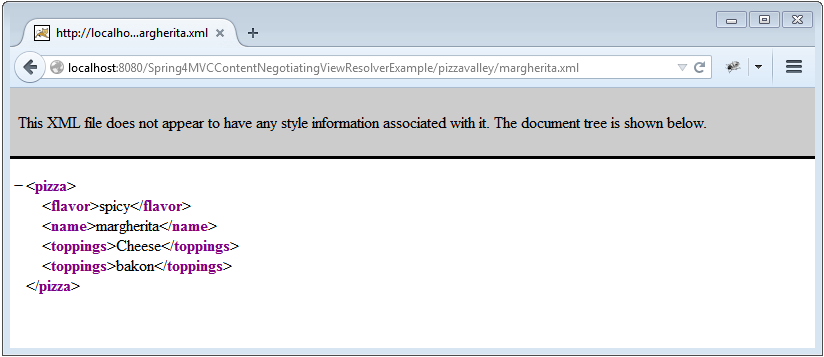
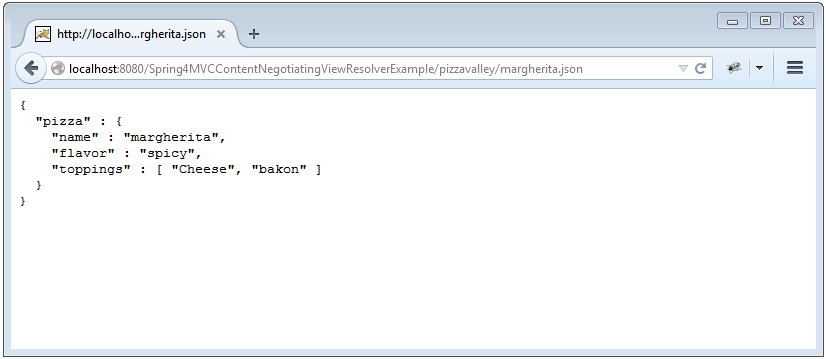
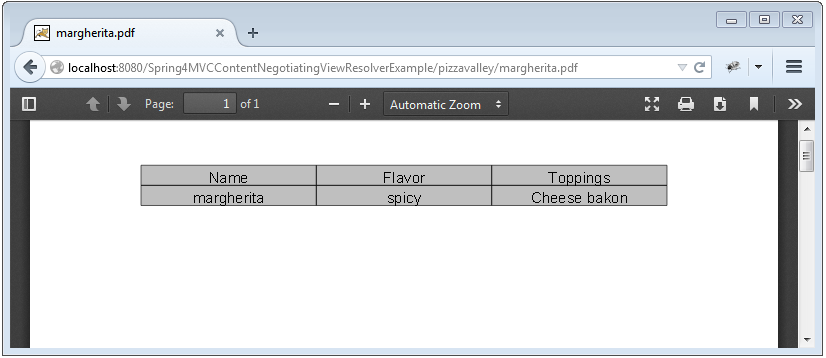
Now build the war (via eclipse or maven [ mvn clean install]). Deploy the war to a Servlet 3.0 container. Since here i am using Tomcat, i will simply put this war file into tomcat webapps folder and click on start.batinside tomcat bin directory.
Run it.Below are the snapshot of sample run triggering deffernt outputs (notice URL extensions)
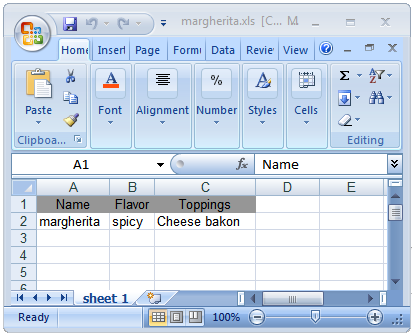

That’s it.
Now build the war (via eclipse or maven [ mvn clean install]). Deploy the war to a Servlet 3.0 container. Since here i am using Tomcat, i will simply put this war file into tomcat webapps folder and click on start.batinside tomcat bin directory.
Run it.Below are the snapshot of sample run triggering deffernt outputs (notice URL extensions)
That’s it.
Download Source Code
클래스에 EnvironmentAware 상속 받은다음에 Override setEnvironment 해주면 됩니다.
시점때문에 생기는 문제네요..
1 2 3 4 5 6 7 8 9 10 11 12 13 14 15 16 17 | @Configuration @PropertySource("classpath:myProperties.properties") public class MyConfiguration implements EnvironmentAware { private Environment environment; @Override public void setEnvironment(final Environment environment) { this.environment = environment; } public void myMethod() { final String myPropertyValue = environment.getProperty("myProperty"); // ... } } | cs |
1 2 3 4 5 6 7 8 9 10 | public class SystemLogApplication implements EnvironmentAware{ @Autowired private static Environment env; @Override public void setEnvironment(Environment environment) { // TODO Auto-generated method stub this.env = environment; } | cs |


