00.Flex,Flash,ActionScript2013. 3. 21. 14:36
반응형

패키지 flash.display
클래스 public class LoaderInfo
상속 LoaderInfo Inheritance EventDispatcher Inheritance Object

언어 버전 : ActionScript 3.0
Player 버전 : Flash Player 9

LoaderInfo 클래스는 로드된 SWF 파일 또는 로드된 이미지 파일(JPEG, GIF, PNG)에 대한 정보를 제공합니다. LoaderInfo 객체는 어떤 표시 객체에서도 사용할 수 있습니다. 제공되는 정보에는 로드 진행률, 로더의 URL 및 로드된 내용, 해당 미디어의 총 바이트 수, 미디어의 공칭 높이 및 폭이 포함됩니다.

두 가지 방법으로 LoaderInfo 객체에 액세스할 수 있습니다.

  • flash.display.Loader 객체의 contentLoaderInfo 속성 - contentLoaderInfo 속성은 모든 Loader 객체에서 언제든지 사용할 수 있습니다. load() 또는 loadBytes() 메서드를 호출하지 않았거나 제대로 로드되지 않은 Loader 객체의 경우, contentLoaderInfo 속성의 여러 속성에 액세스하려고 시도하면 오류가 발생합니다.
  • 표시 객체의 loaderInfo 속성

Loader 객체의 contentLoaderInfo 속성은 Loader 객체가 로드 중인 내용에 대한 정보를 제공하는 반면, DisplayObject 의 loaderInfo 속성은 해당 표시 객체의 루트 SWF 파일에 대한 정보를 제공합니다.

Loader 객체로 로드된 객체(SWF 파일 또는 비트맵)의 loaderInfo 속성은 Loader 객체의 contentLoaderInfo 속성과 동일한 LoaderInfo 객체를 가리킵니다. 즉, 로드된 객체 파일과 이를 로드한 Loader 객체가 하나의 LoaderInfo 객체를 공유합니다. SWF 파일의 기본 클래스 인스턴스에 Loader 객체가 없으므로 loaderInfo 속성이 SWF 파일 기본 클래스 인스턴스의 LoaderInfo에 액세스할 수 있는 유일한 방법입니다.

다음 다이어그램에서는 LoaderInfo 객체의 여러 가지 용도, 즉 SWF 파일의 기본 클래스 인스턴스, Loader 객체의 contentLoaderInfo 속성, 로드된 객체의 loaderInfo 속성으로 사용되는 것을 보여 줍니다.

로딩 작업이 완료되지 않았을 때 Loader 객체의 contentLoaderInfo 속성에서 일부 속성은 사용할 수 없습니다. bytesLoaded, bytesTotal, url, loaderURLapplicationDomain과 같은 일부 속성은 얻을 수 있습니다. loaderInfo 객체가 init 이벤트를 전달할 때 loaderInfo 객체 및 로드된 이미지 또는 SWF 파일의 모든 속성에 액세스할 수 있습니다.

참고: LoaderInfo 객체의 모든 속성은 읽기 전용입니다.

EventDispatcher.dispatchEvent() 메서드는 LoaderInfo 객체에 적용할 수 없습니다. LoaderInfo 객체에서 dispatchEvent()를 호출하면 IllegalOperationError 예외가 발생합니다.

예제를 통해 확인하십시오.

참고 사항


Public 속성
속성 다음에 의해 정의됨
actionScriptVersion : uint
[read-only] 로드된 SWF 파일의 ActionScript 버전입니다.
LoaderInfo
applicationDomain : ApplicationDomain
[read-only] 외부 SWF 파일을 로드할 때, 로드된 클래스에 포함된 모든 ActionScript 3.0 정의는 applicationDomain 속성에 저장됩니다.
LoaderInfo
bytes : ByteArray
[read-only] LoaderInfo 객체와 연관된 바이트입니다.
LoaderInfo
bytesLoaded : uint
[read-only] 해당 미디어에 대해 로드된 바이트 수입니다.
LoaderInfo
bytesTotal : uint
[read-only] 전체 미디어 파일에서 압축된 바이트 수입니다.
LoaderInfo
childAllowsParent : Boolean
[read-only] 내용(자식)의 로더(부모)에 대한 신뢰 관계를 표현합니다.
LoaderInfo
Inherited constructor : Object
지정된 객체 인스턴스의 클래스 객체 또는 생성자 함수에 대한 참조입니다.
Object
content : DisplayObject
[read-only] 이 LoaderInfo 객체와 연관된 로드된 객체입니다.
LoaderInfo
contentType : String
[read-only] 로드된 파일의 MIME 유형입니다.
LoaderInfo
frameRate : Number
[read-only] 로드된 SWF 파일의 공칭 프레임 속도(초당 프레임 수)입니다.
LoaderInfo
height : int
[read-only] 로드된 파일의 공칭 높이입니다.
LoaderInfo
loader : Loader
[read-only] 이 LoaderInfo 객체와 연관된 Loader 객체입니다.
LoaderInfo
loaderURL : String
[read-only] 이 LoaderInfo 객체가 설명하는 미디어의 로딩을 시작한 SWF 파일의 URL입니다.
LoaderInfo
parameters : Object
[read-only] 로드된 SWF 파일에 제공된 매개 변수를 나타내는 이름 값 쌍이 포함된 객체입니다.
LoaderInfo
parentAllowsChild : Boolean
[read-only] Loader(부모)의 내용(자식)에 대한 신뢰 관계를 표현합니다.
LoaderInfo
Inherited prototype : Object
[static] 클래스 또는 함수 객체의 프로토타입 객체에 대한 참조입니다.
Object
sameDomain : Boolean
[read-only] 로더와 내용 간의 도메인 관계를 표현합니다. 원래 도메인이 동일하면 true이고, 그렇지 않으면 false입니다.
LoaderInfo
sharedEvents : EventDispatcher
[read-only] 보안 경계선 너머로 이벤트를 교환하는 데 사용할 수 있는 EventDispatcher 인스턴스입니다.
LoaderInfo
swfVersion : uint
[read-only] 로드된 SWF 파일의 파일 형식 버전입니다.
LoaderInfo
url : String
[read-only] 로드 중인 미디어의 URL입니다.
LoaderInfo
width : int
[read-only] 로드된 내용의 공칭 폭입니다.
LoaderInfo
Public 메서드
메서드 다음에 의해 정의됨
Inherited
addEventListener(type:String, listener:Function, useCapture:Boolean = false, priority:int = 0, useWeakReference:Boolean = false):void
리스너에서 이벤트 알림을 받을 수 있도록 EventDispatcher 객체에 이벤트 리스너 객체를 등록합니다.
EventDispatcher
Inherited
이벤트를 이벤트 흐름으로 전달합니다.
EventDispatcher
[static] 객체로 정의된 SWF 파일과 연관된 LoaderInfo 객체를 반환합니다.
LoaderInfo
Inherited
EventDispatcher 객체에 특정 유형의 이벤트에 대한 리스너가 등록되어 있는지 여부를 확인합니다.
EventDispatcher
Inherited
지정된 속성이 객체에 정의되어 있는지 여부를 나타냅니다.
Object
Inherited
Object 클래스의 인스턴스가 매개 변수로 지정된 객체의 프로토타입 체인에 있는지 여부를 나타냅니다.
Object
Inherited
지정된 속성이 존재하고 열거 가능한지 여부를 나타냅니다.
Object
Inherited
removeEventListener(type:String, listener:Function, useCapture:Boolean = false):void
EventDispatcher 객체에서 리스너를 제거합니다.
EventDispatcher
Inherited
루프 작업에서 동적 속성을 사용할 수 있는지 여부를 설정합니다.
Object
Inherited
지정된 객체의 문자열 표현을 반환합니다.
Object
Inherited
지정된 객체의 프리미티브 값을 반환합니다.
Object
Inherited
이 EventDispatcher 객체 또는 조상 객체에 지정한 이벤트 유형에 대한 이벤트 리스너가 등록되어 있는지 여부를 확인합니다.
EventDispatcher
이벤트
이벤트 요약 다음에 의해 정의됨
Inherited Flash Player가 운영 체제에서 포커스를 얻어 활성화될 때 전달됩니다. EventDispatcher
데이터가 성공적으로 로드되면 전달됩니다. LoaderInfo
Inherited Flash Player가 운영 체제에서 포커스를 잃고 비활성화될 때 전달됩니다. EventDispatcher
HTTP를 통해 네트워크 요청이 이루어지고 Flash Player가 해당 HTTP 상태 코드를 감지할 수 있을 때 전달됩니다. LoaderInfo
로드된 SWF 파일의 속성 및 메서드에 액세스할 수 있을 때 전달됩니다. LoaderInfo
로드 작업 실패를 유발하는 입력 또는 출력 오류가 발생할 때 전달됩니다. LoaderInfo
로드 작업이 시작될 때 전달됩니다. LoaderInfo
다운로드 작업이 진행되어 데이터가 수신될 때 전달됩니다. LoaderInfo
Loader 객체의 unload() 메서드를 사용하여 로드된 객체를 제거할 때마다, 또는 동일한 Loader 객체를 통해 두 번째 로드를 수행하고 로드를 시작하기에 앞서 원본 내용을 제거할 때 LoaderInfo 객체에 의해 전달됩니다. LoaderInfo
속성 정보
actionScriptVersion 속성
actionScriptVersion:uint [read-only]

언어 버전 : ActionScript 3.0
Player 버전 : Flash Player 9

로드된 SWF 파일의 ActionScript 버전입니다. 언어 버전은 ActionScriptVersion.ACTIONSCRIPT2ActionScriptVersion.ACTIONSCRIPT3과 같이 ActionScriptVersion 클래스의 열거 유형을 사용하여 지정됩니다.

참고: 이 속성은 항상 ActionScriptVersion.ACTIONSCRIPT2 또는 ActionScriptVersion.ACTIONSCRIPT3 중 하나를 값으로 갖습니다. ActionScript 1.0 및 2.0 모두 ActionScriptVersion.ACTIONSCRIPT2(버전 2.0)로 보고됩니다. 이 속성에서는 ActionScript 1.0 및 2.0을 ActionScript 3.0과 구분할 뿐입니다.


구현
public function get actionScriptVersion():uint

오류
Error — 요청한 정보를 검색할 수 있을 만큼 파일이 다운로드되지 않은 경우입니다.
Error — 파일이 SWF 파일이 아닌 경우입니다.

참고 사항

applicationDomain 속성
applicationDomain:ApplicationDomain [read-only]

언어 버전 : ActionScript 3.0
Player 버전 : Flash Player 9

외부 SWF 파일을 로드할 때, 로드된 클래스에 포함된 모든 ActionScript 3.0 정의는 applicationDomain 속성에 저장됩니다.

SWF 파일의 모든 코드는 응용 프로그램 도메인에 존재하도록 정의됩니다. 현재 응용 프로그램 도메인은 주 응용 프로그램이 실행되는 위치입니다. 시스템 도메인에는 현재 도메인을 포함하여 모든 응용 프로그램 도메인이 포함되므로 모든 Flash Player 클래스가 들어 있습니다.

시스템 도메인을 제외한 모든 응용 프로그램 도메인에는 연관된 부모 도메인이 있습니다. 기본 응용 프로그램 applicationDomain의 부모 도메인은 시스템 도메인입니다. 로드된 클래스는 부모에서 아직 정의되지 않은 경우에만 정의됩니다. 로드된 클래스 정의를 새 정의를 사용하여 재정의할 수는 없습니다.

응용 프로그램 도메인 사용법 관련 예제는 ActionScript 3.0 프로그래밍의 "클라이언트 시스템 환경" 장을 참조하십시오.


구현
public function get applicationDomain():ApplicationDomain

오류
SecurityError — 호출자의 이 보안 샌드박스는 이 ApplicationDomain에 액세스할 수 없습니다.

참고 사항

bytes 속성
bytes:ByteArray [read-only]

언어 버전 : ActionScript 3.0

LoaderInfo 객체와 연관된 바이트입니다.


구현
public function get bytes():ByteArray

오류
SecurityError — 이 API에 액세스하는 객체가 보안 제한 사항 때문에 로드된 객체에 액세스할 수 없는 경우입니다. 예를 들어, Loader 객체가 contentLoaderInfo.content 속성에 대한 액세스를 시도하는데 로드된 내용에 액세스할 수 있는 보안 권한이 부여되지 않은 경우에 해당됩니다.

자세한 내용은 ActionScript 3.0 프로그래밍의 "Flash Player 보안" 장을 참조하십시오.

플레이어 버전: Flash Player 9 업데이트 3.

bytesLoaded 속성
bytesLoaded:uint [read-only]

언어 버전 : ActionScript 3.0
Player 버전 : Flash Player 9

해당 미디어에 대해 로드된 바이트 수입니다. 이 숫자가 bytesTotal 값과 동일하면 모든 바이트가 로드된 것입니다.


구현
public function get bytesLoaded():uint
bytesTotal 속성
bytesTotal:uint [read-only]

언어 버전 : ActionScript 3.0
Player 버전 : Flash Player 9

전체 미디어 파일에서 압축된 바이트 수입니다.

이 LoaderInfo 객체의 Loader 객체가 첫 번째 progress 이벤트를 전달하기 전에 bytesTotal은 0입니다. Loader 객체에서 첫 번째 progress 이벤트 발생 후 bytesTotal에서 다운로드할 실제 바이트 수가 반영됩니다.


구현
public function get bytesTotal():uint

참고 사항

childAllowsParent 속성
childAllowsParent:Boolean [read-only]

언어 버전 : ActionScript 3.0
Player 버전 : Flash Player 9

내용(자식)의 로더(부모)에 대한 신뢰 관계를 표현합니다. 자식이 부모의 액세스를 허용한 경우 true이며, 그렇지 않으면 false입니다. 자식 객체가 allowDomain() 메서드를 호출하여 부모 도메인에게 권한을 부여한 경우 또는 크로스 도메인 정책이 자식 도메인에 로드되어 부모 도메인에게 권한을 부여한 경우 이 속성은 true로 설정됩니다. 부모와 자식이 같은 도메인에 있으면 이 속성은 true로 설정됩니다.

자세한 내용은 ActionScript 3.0 프로그래밍의 "Flash Player 보안" 장을 참조하십시오.


구현
public function get childAllowsParent():Boolean

오류
Error — 요청한 정보를 검색할 수 있을 만큼 파일이 다운로드되지 않았을 때 발생합니다.
content 속성
content:DisplayObject [read-only]

언어 버전 : ActionScript 3.0
Player 버전 : Flash Player 9

이 LoaderInfo 객체와 연관된 로드된 객체입니다.


구현
public function get content():DisplayObject

오류
SecurityError — 이 API에 액세스하는 객체가 보안 제한 사항 때문에 로드된 객체에 액세스할 수 없는 경우입니다. 예를 들어, Loader 객체가 contentLoaderInfo.content 속성에 대한 액세스를 시도하는데 로드된 내용에 액세스할 수 있는 보안 권한이 부여되지 않은 경우에 해당됩니다.

자세한 내용은 ActionScript 3.0 프로그래밍의 "Flash Player 보안" 장을 참조하십시오.

contentType 속성
contentType:String [read-only]

언어 버전 : ActionScript 3.0
Player 버전 : Flash Player 9

로드된 파일의 MIME 유형입니다. Flash Player가 유형을 결정하기에 충분할 만큼 파일이 로드되지 않은 경우 이 값은 null입니다. 다음 목록에 나열된 값을 가질 수 있습니다.

  • "application/x-shockwave-flash"
  • "image/jpeg"
  • "image/gif"
  • "image/png"


구현
public function get contentType():String
frameRate 속성
frameRate:Number [read-only]

언어 버전 : ActionScript 3.0
Player 버전 : Flash Player 9

로드된 SWF 파일의 공칭 프레임 속도(초당 프레임 수)입니다. 이 숫자는 정수인 경우가 많지만 반드시 정수일 필요는 없습니다.

이 값은 실제 사용 중인 프레임 속도와 다를 수 있습니다. Flash Player에서는 모든 로드된 SWF 파일에 대해 한 번에 하나의 프레임 속도만 사용하며, 이 프레임 속도는 기본 SWF 파일의 공칭 프레임 속도에 의해 결정됩니다. 또한 하드웨어, 사운드 동기화 및 기타 요인에 의해 Flash Player가 기본 프레임 속도에 도달하지 못할 수도 있습니다.


구현
public function get frameRate():Number

오류
Error — 요청한 정보를 검색할 수 있을 만큼 파일이 다운로드되지 않은 경우입니다.
Error — 파일이 SWF 파일이 아닌 경우입니다.
height 속성
height:int [read-only]

언어 버전 : ActionScript 3.0
Player 버전 : Flash Player 9

로드된 파일의 공칭 높이입니다. 이 값은 내용이 표시되는 실제 높이와 다를 수 있습니다. 로드된 내용 또는 그 부모 표시 객체의 크기가 조절될 수 있기 때문입니다.


구현
public function get height():int

오류
Error — 요청한 정보를 검색할 수 있을 만큼 파일이 다운로드되지 않은 경우입니다.
loader 속성
loader:Loader [read-only]

언어 버전 : ActionScript 3.0
Player 버전 : Flash Player 9

이 LoaderInfo 객체와 연관된 Loader 객체입니다. 이 LoaderInfo 객체가 SWF 파일 기본 클래스 인스턴스의 loaderInfo 속성이면 연관된 Loader 객체가 없습니다.


구현
public function get loader():Loader

오류
SecurityError — 이 API에 액세스하는 객체가 보안 제한 사항 때문에 Loader 객체에 액세스할 수 없는 경우입니다. 예를 들어, 로드된 SWF 파일이 loaderInfo.loader 속성에 대한 액세스를 시도하는데 로드 중인 SWF 파일에 액세스할 수 있는 보안 권한이 부여되지 않은 경우에 해당됩니다.

자세한 내용은 ActionScript 3.0 프로그래밍의 "Flash Player 보안" 장을 참조하십시오.

loaderURL 속성
loaderURL:String [read-only]

언어 버전 : ActionScript 3.0
Player 버전 : Flash Player 9

이 LoaderInfo 객체가 설명하는 미디어의 로딩을 시작한 SWF 파일의 URL입니다. SWF 파일 기본 클래스의 인스턴스에서 이 URL은 SWF 파일 자체의 URL과 동일합니다.


구현
public function get loaderURL():String
parameters 속성
parameters:Object [read-only]

언어 버전 : ActionScript 3.0
Player 버전 : Flash Player 9

로드된 SWF 파일에 제공된 매개 변수를 나타내는 이름 값 쌍이 포함된 객체입니다.

for-in 루프를 사용하여 parameters 객체에서 모든 이름 및 값을 추출할 수 있습니다.

매개 변수의 두 가지 소스는 기본 SWF 파일 URL의 쿼리 문자열과 FlashVars HTML 매개 변수 값(기본 SWF 파일에만 영향을 미침)입니다.

parameters 속성은 ActionScript 1.0 및 2.0에서 SWF 파일 매개 변수를 기본 타임라인의 속성으로 제공하는 기법을 대체합니다.

ActionScript 1.0 또는 2.0을 사용하는 SWF 파일이 포함된 Loader 객체의 경우 parameters 속성 값이 null입니다. ActionScript 3.0을 사용하는 SWF 파일이 포함된 Loader 객체의 경우에만 이 값이 null이 아닙니다.


구현
public function get parameters():Object
parentAllowsChild 속성
parentAllowsChild:Boolean [read-only]

언어 버전 : ActionScript 3.0
Player 버전 : Flash Player 9

Loader(부모)의 내용(자식)에 대한 신뢰 관계를 표현합니다. 부모가 자식의 액세스를 허용한 경우 true이며, 그렇지 않으면 false입니다. 부모 객체가 allowDomain() 메서드를 호출하여 자식 도메인에게 권한을 부여한 경우 또는 크로스 도메인 정책이 부모 도메인에 로드되어 자식 도메인에게 권한을 부여한 경우 이 속성은 true로 설정됩니다. 부모와 자식이 같은 도메인에 있으면 이 속성은 true로 설정됩니다.

자세한 내용은 ActionScript 3.0 프로그래밍의 "Flash Player 보안" 장을 참조하십시오.


구현
public function get parentAllowsChild():Boolean

오류
Error — 요청한 정보를 검색할 수 있을 만큼 파일이 다운로드되지 않았을 때 발생합니다.
sameDomain 속성
sameDomain:Boolean [read-only]

언어 버전 : ActionScript 3.0
Player 버전 : Flash Player 9

로더와 내용 간의 도메인 관계를 표현합니다. 원래 도메인이 동일하면 true이고, 그렇지 않으면 false입니다.


구현
public function get sameDomain():Boolean

오류
Error — 요청한 정보를 검색할 수 있을 만큼 파일이 다운로드되지 않았을 때 발생합니다.
sharedEvents 속성
sharedEvents:EventDispatcher [read-only]

언어 버전 : ActionScript 3.0
Player 버전 : Flash Player 9

보안 경계선 너머로 이벤트를 교환하는 데 사용할 수 있는 EventDispatcher 인스턴스입니다. 로더 및 로드된 대상이 서로 신뢰하지 않더라도 양쪽 모두 sharedEvents에 액세스할 수 있습니다.


구현
public function get sharedEvents():EventDispatcher
swfVersion 속성
swfVersion:uint [read-only]

언어 버전 : ActionScript 3.0
Player 버전 : Flash Player 9

로드된 SWF 파일의 파일 형식 버전입니다. 파일 형식은 SWFVersion.FLASH7SWFVersion.FLASH9와 같이 SWFVersion 클래스의 열거 유형을 사용하여 지정됩니다.


구현
public function get swfVersion():uint

오류
Error — 요청한 정보를 검색할 수 있을 만큼 파일이 다운로드되지 않은 경우입니다.
Error — 파일이 SWF 파일이 아닌 경우입니다.

참고 사항

url 속성
url:String [read-only]

언어 버전 : ActionScript 3.0
Player 버전 : Flash Player 9

로드 중인 미디어의 URL입니다.

이 LoaderInfo 객체의 Loader 객체가 첫 번째 progress 이벤트를 전달하기 전에는 Loader 객체의 load() 메서드를 호출할 때 지정된 초기 URL만 url 속성 값에 반영될 수 있습니다. 첫 번째 progress 이벤트가 발생한 후 url 속성은 모든 리디렉션 및 상대 URL이 처리된 후 미디어의 최종 URL을 반영합니다.


구현
public function get url():String

참고 사항

width 속성
width:int [read-only]

언어 버전 : ActionScript 3.0
Player 버전 : Flash Player 9

로드된 내용의 공칭 폭입니다. 이 값은 내용이 표시되는 실제 폭과 다를 수 있습니다. 로드된 내용 또는 그 부모 표시 객체의 크기가 조절될 수 있기 때문입니다.


구현
public function get width():int

오류
Error — 요청한 정보를 검색할 수 있을 만큼 파일이 다운로드되지 않은 경우입니다.
메서드 정보
getLoaderInfoByDefinition () 메서드
public static function getLoaderInfoByDefinition(object:Object):LoaderInfo

언어 버전 : ActionScript 3.0

객체로 정의된 SWF 파일과 연관된 LoaderInfo 객체를 반환합니다.

플레이어 버전: Flash Player 9 업데이트 3.

매개 변수

object:Object — SWF 파일 객체입니다.

반환값
LoaderInfo — 연관된 LoaderInfo 객체입니다.
이벤트 정보
complete 이벤트
이벤트 객체 유형: flash.events.Event
Event.type property = flash.events.Event.COMPLETE

언어 버전 : ActionScript 3.0
Player 버전 : Flash Player 9

데이터가 성공적으로 로드되면 전달됩니다. complete 이벤트는 항상 init 이벤트 이후에 전달됩니다.

complete 이벤트 객체의 type 속성 값을 정의합니다.

이 이벤트에는 다음과 같은 속성이 있습니다.

속성
bubbles false
cancelable false; 취소할 기본 비헤이비어가 없습니다.
currentTarget 현재 이벤트 리스너를 통해 Event 객체를 처리하고 있는 객체입니다.
target 로드가 완료된 네트워크 객체입니다.

참고 사항

httpStatus 이벤트
이벤트 객체 유형: flash.events.HTTPStatusEvent
HTTPStatusEvent.type property = flash.events.HTTPStatusEvent.HTTP_STATUS

언어 버전 : ActionScript 3.0
Player 버전 : Flash Player 9

HTTP를 통해 네트워크 요청이 이루어지고 Flash Player가 해당 HTTP 상태 코드를 감지할 수 있을 때 전달됩니다.

httpStatus 이벤트 객체의 type 속성 값을 정의합니다.

이 이벤트에는 다음과 같은 속성이 있습니다.

속성
bubbles false
cancelable false; 취소할 기본 비헤이비어가 없습니다.
currentTarget 현재 이벤트 리스너를 통해 Event 객체를 처리하고 있는 객체입니다.
status 서버에 의해 반환된 HTTP 상태 코드입니다.
target HTTP 상태 코드를 수신하는 네트워크 객체입니다.

참고 사항

init 이벤트
이벤트 객체 유형: flash.events.Event
Event.type property = flash.events.Event.INIT

언어 버전 : ActionScript 3.0
Player 버전 : Flash Player 9

로드된 SWF 파일의 속성 및 메서드에 액세스할 수 있을 때 전달됩니다. 다음 두 조건이 존재할 경우 LoaderInfo 객체는 init 이벤트를 전달합니다.

  • 로드된 객체와 연관된 모든 속성 및 메서드, 그리고 LoaderInfo 객체와 연관된 모든 속성 및 메서드에 액세스 가능합니다.
  • 모든 자식 객체의 생성자가 완료되었습니다.

init 이벤트는 항상 complete 이벤트 이전에 전달됩니다.

init 이벤트 객체의 type 속성 값을 정의합니다.

이 이벤트에는 다음과 같은 속성이 있습니다.

속성
bubbles false
cancelable false; 취소할 기본 비헤이비어가 없습니다.
currentTarget 현재 이벤트 리스너를 통해 Event 객체를 처리하고 있는 객체입니다.
target 로드 중인 SWF 파일과 연관된 LoaderInfo 객체입니다.

참고 사항

ioError 이벤트
이벤트 객체 유형: flash.events.IOErrorEvent
IOErrorEvent.type property = flash.events.IOErrorEvent.IO_ERROR

언어 버전 : ActionScript 3.0
Player 버전 : Flash Player 9

로드 작업 실패를 유발하는 입력 또는 출력 오류가 발생할 때 전달됩니다.

ioError 이벤트 객체의 type 속성 값을 정의합니다.

이 이벤트에는 다음과 같은 속성이 있습니다.

속성
bubbles false
cancelable false; 취소할 기본 비헤이비어가 없습니다.
currentTarget 현재 이벤트 리스너를 통해 Event 객체를 처리하고 있는 객체입니다.
target 입력/출력 오류가 발생한 네트워크 객체입니다.
text 오류 메시지로 표시될 텍스트입니다.

참고 사항

open 이벤트
이벤트 객체 유형: flash.events.Event
Event.type property = flash.events.Event.OPEN

언어 버전 : ActionScript 3.0
Player 버전 : Flash Player 9

로드 작업이 시작될 때 전달됩니다.

open 이벤트 객체의 type 속성 값을 정의합니다.

이 이벤트에는 다음과 같은 속성이 있습니다.

속성
bubbles false
cancelable false; 취소할 기본 비헤이비어가 없습니다.
currentTarget 현재 이벤트 리스너를 통해 Event 객체를 처리하고 있는 객체입니다.
target 연결을 설정한 네트워크 객체입니다.

참고 사항

progress 이벤트
이벤트 객체 유형: flash.events.ProgressEvent
ProgressEvent.type property = flash.events.ProgressEvent.PROGRESS

언어 버전 : ActionScript 3.0
Player 버전 : Flash Player 9

다운로드 작업이 진행되어 데이터가 수신될 때 전달됩니다.

progress 이벤트 객체의 type 속성 값을 정의합니다.

이 이벤트에는 다음과 같은 속성이 있습니다.

속성
bubbles false
bytesLoaded 리스너가 이벤트를 처리할 때 로드된 항목 수 또는 바이트 수입니다.
bytesTotal 로드 프로세스가 완료되면 최종적으로 로드될 총 바이트 수 또는 항목 수입니다.
cancelable false; 취소할 기본 비헤이비어가 없습니다.
currentTarget 현재 이벤트 리스너를 통해 Event 객체를 처리하고 있는 객체입니다.
target 진행률을 보고하는 네트워크 객체입니다.

참고 사항

unload 이벤트
이벤트 객체 유형: flash.events.Event
Event.type property = flash.events.Event.UNLOAD

언어 버전 : ActionScript 3.0
Player 버전 : Flash Player 9

Loader 객체의 unload() 메서드를 사용하여 로드된 객체를 제거할 때마다, 또는 동일한 Loader 객체가 두 번째 로드를 실행하기 위해 먼저 원본 내용을 제거할 때 LoaderInfo 객체에 의해 전달됩니다.

unload 이벤트 객체의 type 속성 값을 정의합니다.

이 이벤트에는 다음과 같은 속성이 있습니다.

속성
bubbles false
cancelable false; 취소할 기본 비헤이비어가 없습니다.
currentTarget 현재 이벤트 리스너를 통해 Event 객체를 처리하고 있는 객체입니다.
target 언로드하거나 교체할 SWF 파일과 연관된 LoaderInfo 객체입니다.

참고 사항

LoaderInfoExample.as

다음 예제에서는 LoaderInfoExample 클래스를 사용하여 스테이지에 이미지를 표시합니다. 이는 다음 단계로 이루어집니다.
  1. 이미지의 이름과 위치를 나타내는 url 속성이 만들어집니다.
  2. 클래스 생성자가 loader라는 이름의 Loader 객체를 생성합니다.
  3. loader 객체가 이미지를 제대로 로드하기 위해 이벤트 리스너를 인스턴스화합니다.
  4. 생성자가 파일 이름 및 위치를 나타내도록 전달된 url이 있는 새 URLRequest 객체 request를 만듭니다.
  5. 그런 다음 request 객체가 loader 객체의 load() 메서드로 전달되며, 이 메서드는 이미지를 표시 목록으로 로드합니다.

중요: 이 예제에서는 컴파일된 SWF 파일과 같은 디렉토리에 Image.gif 파일이 있어야 합니다. 기본 SWF 파일의 크기에 알맞은 영역이 있는 이미지를 사용합니다.

package {
    import flash.display.Loader;
    import flash.display.LoaderInfo;
    import flash.display.Sprite;
    import flash.events.*;
    import flash.net.URLRequest;

    public class LoaderInfoExample extends Sprite {
        private var url:String = "Image.gif";

        public function LoaderInfoExample() {
            var loader:Loader = new Loader();
            loader.contentLoaderInfo.addEventListener(Event.INIT, initHandler);
            loader.contentLoaderInfo.addEventListener(IOErrorEvent.IO_ERROR, ioErrorHandler);
            var request:URLRequest = new URLRequest(url);
            loader.load(request);
            addChild(loader);
        }

        private function initHandler(event:Event):void {
            var loader:Loader = Loader(event.target.loader);
            var info:LoaderInfo = LoaderInfo(loader.contentLoaderInfo);
            trace("initHandler: loaderURL=" + info.loaderURL + " url=" + info.url);
        }

        private function ioErrorHandler(event:IOErrorEvent):void {
            trace("ioErrorHandler: " + event);
        }
    }
}
Posted by 1010
00.Flex,Flash,ActionScript2013. 3. 21. 12:43
반응형

var loader:Loader = new Loader();
addChild
(loader);
loader
.load(new URLRequest("my-flex-app.swf"));
loader
.addEventListener("mx.managers.SystemManager.isBootstrapRoot", systemManagerHandler);
loader
.addEventListener("mx.managers.SystemManager.isStageRoot", systemManagerHandler);

function systemManagerHandler(event:Event):void { event.preventDefault(); }


이거때문에 삽질했음...T.T


Posted by 1010
00.Flex,Flash,ActionScript2013. 3. 20. 18:38
반응형


출ㅊ: http://cafe.naver.com/flexcomponent.cafe?iframe_url=/ArticleRead.nhn%3Farticleid=3464


안녕하세요, 명랑늑대입니다. 이 카페에 가입한 후 첫 글을 남기게 되네요.

저는 최근에 Sprite을 상속한 클래스를 구현하다가 width, height(Sprite 클래스에 정의된 프라퍼티들)의 값을 생성자에서 변경하는 것이 잘 안 되는 문제를 겪었습니다.


카페를 검색해보니, 거친마루 님께서도 같은 문제를 겪으션던지 질문을 올리셨더군요.

http://cafe.naver.com/flexcomponent/2034

그런데 아직 해결되지 않은 의문인 건 같아서, 제가 좀더 파고 들어봤습니다.

Sprite 객체의 width/height 값을 변경하면 내부적으로 어떤 일이 일어나는가?

var aSprite:Sprite = new Sprite();

....

aSprite.width = 100;

위와 같이 Sprite 객체의 width 프라퍼티에 새 값을 대입하면, width의 값이 바뀌는 것으로 끝나지 않습니다.
Sprite에 정의된 scaleX, scaleY도 함께 변합니다(사실은 그 외에도 함께 바뀌는 프라퍼티들이 여럿 더 있습니다만, 이번 논의와는 직접적인 관련이 없으므로 언급하지 않겠습니다). 아시다시피 scaleX, scaleY는 스케일링에 관련된 놈들이죠.

그렇다면 width 값을 바꾸려고 했을 뿐인데, 왜 스케일링에 관련된 프라퍼티들이 *자동으로* 바뀌는가?

이는 전형적인 GUI 컴포넌트의 크기를 바꾸는 것과 Sprite의 크기를 바꾸는 행위가 전혀 다른 의미를 내포하고 있기 때문이라고 할 수 있습니다.

예를 들어, 여러 개의 하위 컴포넌트가 들어있는 컨테이너의 크기를 바꾸면 어떤 일이 일어나나요?

하위 컴포넌트들의 크기도 함께 변할 것입니다(아닐 수도 있지만). 심지어는 컴포넌트들의 배치가 달라지기도 합니다. 그래서 레이아웃의 개념이 들어가죠. 즉, 컨테이너의 크기가 바뀐 비율과는 상관없이 레이아웃 정책에 의해 너비만 늘어나거나 위치가 바뀌거나 합니다.

그러나 Sprite은 전통적인 의미에서의 GUI 컴포넌트가 아닙니다. 레퍼런스 문서에도 설명되어 있듯이 일종의 MovieClip이죠.
동영상 재생기의 윈도우 크기를 바꾸면 어떻게 됩니까? 재생하고 있는 동영상의 화면 크기가 그에 맞춰 스케일링 됩니다. 이건 상식적으로도 당연한 행동입니다.
Sprite의 행동도 이와 마찬가지입니다. Sprite의 크기를 바꾸면 그 자신이 화면에 그리는 내용은 물론이고 그 Sprite에 속해있는(아시다시피 Sprite은 DisplayObjectContainer입니다) 하위 DisplayObject들까지도 스케일링 됩니다.

즉, Sprite의 크기가 바뀌면 그 Sprite은 물론이고 다른 DisplayObject들의 스케일링까지 바꿔야 하므로, 크기가 얼마나 변했는지를 기억하고 있어야 합니다. 따라서 해당 프라퍼티인 scaleX, scaleY가 크기 변화와 함께 바뀌는 것이 당연하겠죠?

따라서 Sprite을 상속받은 클래스의 생성자에서 width/height의 값을 바꾸면 아무 소용이 없습니다.

왜냐하면, width/height의 초기값은 0이기 때문입니다.

예를 들어, width에 100을 대입하려고 하면 scaleX = newWidth / oldWidth이므로(정확한 공식은 아닙니다. scaleX의 이전 값을 고려해야 하죠 원래는) 100 / 0 = NaN, 즉 scaleX가 0이 됩니다.

그리고 width 값은 scaleX가 계산된 후에 scaleX * oldWidth가 되는 것 같습니다.

따라서 또한 0이 될 수 밖에 없죠.

(이 부분은 Sprite의 소스 코드가 없어서 확실하진 않습니다만, 개인적으로는 이렇게 추측합니다. 왜 그렇게 하는지는 모르겠구요. ㅎㅎ)

그리고 우리를 더 힘들게 만드는 문제점은 위와 같이 생성자에서 width/height에 값을 대입하고 나면, 이후에 무슨 짓을 해도 해당 Sprite이 화면에 나타나지 않는다는 점입니다.

scaleX 또는 scaleY가 0이 되므로 화면에 나타나지 않는게 당연합니다.

아시다시피 Sprite에 다른 DisplayObject를 add하거나 graphics에 뭔가를 그리면 Sprite의 width/height이 자동으로 바뀌지만, 스케일 팩터가 0이므로, 곱하고 나면 그릴 영역이 없습니다.

그렇다면 Sprite의 width/height 값은 언제 세팅하면 되는 것일까?

물론 width/height가 0이 아닐 때 세팅하면 되겠습니다. 즉, Sprite을 상속해서 만든 객체의 크기를 세팅하고 싶을 때에는 좀 귀찮지만 그 Sprite의 내용(하위 DisplayObject 또는 graphics에 직접 그린 내용)이 완성된 후에 하는 것이 가장 좋을 듯 합니다.

** 글을 쓰다보니 좀 길어졌네요.

혹시 UIComponent가 아니라 Sprite을 상대하다가 이런 비슷한 문제를 겪으신 분들께 조금이나마 도움이 됐으면 좋겠습니다.


Posted by 1010
00.Flex,Flash,ActionScript2013. 3. 20. 10:50
반응형


KB2TIMS_RemoteObject.zip


-- RemoteObjectTest.mxml --

<?xml version="1.0" encoding="utf-8"?>
<mx:Application xmlns:mx="http://www.adobe.com/2006/mxml" layout="absolute" creationComplete="init();">
 <mx:Script>
  <![CDATA[
   import mx.messaging.ChannelSet;
   import mx.messaging.channels.AMFChannel;
    import mx.rpc.events.FaultEvent;
    import mx.rpc.events.ResultEvent;
    import mx.controls.Alert;
  
 private function init():void{
//  var amfChannel:AMFChannel = new AMFChannel("my-amf","http://localhost:5050//messagebroker/amf");
//     var channelSet:ChannelSet = new ChannelSet();
//     channelSet.addChannel(amfChannel);
//     Alert.show("init~");
   }
  
   private function resultHandler(event:ResultEvent):void{
    var msg:String = event.result as String;
    Alert.show("원격객체호출성공, "+msg);
   }
   private function faultHandler(event:FaultEvent):void{
    Alert.show("실패!!!!!"+event.toString());
   }
   private function remotoObjectCall():void{
  ro.getMsg();
   }
  ]]>
 </mx:Script>
 
 <mx:RemoteObject id="ro" destination="HelloRO" showBusyCursor="true" fault="faultHandler(event)">
  <mx:method name="getMsg" result="resultHandler(event)" />
 </mx:RemoteObject>
 
 <mx:Panel y="19" width="250" height="200" layout="absolute" horizontalCenter="0">
  <mx:Button y="39" label="원격객체호출" horizontalCenter="0" click="remotoObjectCall()"/>
 </mx:Panel>
 
</mx:Application>


-- callJavaObject.java --


package flex.remote.object;

import org.apache.log4j.Logger;

public class callJavaObject {
 
 private Logger logger = Logger.getLogger( this.getClass() );
 
 public callJavaObject() {
  // TODO Auto-generated constructor stub
  logger.debug("callJavaObject go~");
 }
 public String getMsg(){
  return "callJavaObject 호출됨";
 }
}

-- messaging-config.xml


<?xml version="1.0" encoding="UTF-8"?>
<service id="message-service"
    class="flex.messaging.services.MessageService">

    <adapters>
        <adapter-definition id="actionscript" class="flex.messaging.services.messaging.adapters.ActionScriptAdapter" default="true" />
        <!-- <adapter-definition id="jms" class="flex.messaging.services.messaging.adapters.JMSAdapter"/> -->
    </adapters>

    <default-channels>
        <channel ref="my-polling-amf"/>
    </default-channels>

</service>


-- proxy-config.xml

<?xml version="1.0" encoding="UTF-8"?>
<service id="proxy-service"
    class="flex.messaging.services.HTTPProxyService">

    <properties>
        <connection-manager>
            <max-total-connections>100</max-total-connections>
            <default-max-connections-per-host>2</default-max-connections-per-host>
        </connection-manager>
        <allow-lax-ssl>true</allow-lax-ssl>
    </properties>

    <adapters>
        <adapter-definition id="http-proxy" class="flex.messaging.services.http.HTTPProxyAdapter" default="true"/>
        <adapter-definition id="soap-proxy" class="flex.messaging.services.http.SOAPProxyAdapter"/>
    </adapters>

    <default-channels>
        <channel ref="my-amf"/>
    </default-channels>

    <destination id="DefaultHTTP">
    </destination>

</service>

-- remoting-config.xml

<?xml version="1.0" encoding="UTF-8"?>
<service id="remoting-service"
    class="flex.messaging.services.RemotingService">

    <adapters>
        <adapter-definition id="java-object" class="flex.messaging.services.remoting.adapters.JavaAdapter" default="true"/>
    </adapters>

    <default-channels>
        <channel ref="my-amf"/>
    </default-channels>
   
    <destination id="HelloRO">
  <properties>
   <source>flex.remote.object.callJavaObject</source>
  </properties>
 </destination>

</service>


-- services-config.xml


<?xml version="1.0" encoding="UTF-8"?>
<services-config>

    <services>
        <service-include file-path="remoting-config.xml" />
        <service-include file-path="proxy-config.xml" />
        <service-include file-path="messaging-config.xml" />       
    </services>

    <security>
        <login-command class="flex.messaging.security.TomcatLoginCommand" server="Tomcat"/>
        <!-- Uncomment the correct app server
        <login-command class="flex.messaging.security.TomcatLoginCommand" server="JBoss">
  <login-command class="flex.messaging.security.JRunLoginCommand" server="JRun"/>       
        <login-command class="flex.messaging.security.WeblogicLoginCommand" server="Weblogic"/>
        <login-command class="flex.messaging.security.WebSphereLoginCommand" server="WebSphere"/>
        -->

        <!--
        <security-constraint id="basic-read-access">
            <auth-method>Basic</auth-method>
            <roles>
                <role>guests</role>
                <role>accountants</role>
                <role>employees</role>
                <role>managers</role>
            </roles>
        </security-constraint>
         -->
    </security>

    <channels>

        <channel-definition id="my-amf" class="mx.messaging.channels.AMFChannel">
            <endpoint url="http://{server.name}:{server.port}/messagebroker/amf" class="flex.messaging.endpoints.AMFEndpoint"/>
        </channel-definition>

        <channel-definition id="my-secure-amf" class="mx.messaging.channels.SecureAMFChannel">
            <endpoint url="https://{server.name}:{server.port}/{context.root}/messagebroker/amfsecure" class="flex.messaging.endpoints.SecureAMFEndpoint"/>
            <properties>
                <add-no-cache-headers>false</add-no-cache-headers>
            </properties>
        </channel-definition>

        <channel-definition id="my-polling-amf" class="mx.messaging.channels.AMFChannel">
            <endpoint url="http://{server.name}:{server.port}/{context.root}/messagebroker/amfpolling" class="flex.messaging.endpoints.AMFEndpoint"/>
            <properties>
                <polling-enabled>true</polling-enabled>
                <polling-interval-seconds>4</polling-interval-seconds>
            </properties>
        </channel-definition>

        <!--
        <channel-definition id="my-http" class="mx.messaging.channels.HTTPChannel">
            <endpoint url="http://{server.name}:{server.port}/{context.root}/messagebroker/http" class="flex.messaging.endpoints.HTTPEndpoint"/>
        </channel-definition>

        <channel-definition id="my-secure-http" class="mx.messaging.channels.SecureHTTPChannel">
            <endpoint url="https://{server.name}:{server.port}/{context.root}/messagebroker/httpsecure" class="flex.messaging.endpoints.SecureHTTPEndpoint"/>
            <properties>
                <add-no-cache-headers>false</add-no-cache-headers>
            </properties>
        </channel-definition>
        -->
    </channels>

    <logging>
        <target class="flex.messaging.log.ConsoleTarget" level="Error">
            <properties>
                <prefix>[BlazeDS] </prefix>
                <includeDate>false</includeDate>
                <includeTime>false</includeTime>
                <includeLevel>false</includeLevel>
                <includeCategory>false</includeCategory>
            </properties>
            <filters>
                <pattern>Endpoint.*</pattern>
                <pattern>Service.*</pattern>
                <pattern>Configuration</pattern>
            </filters>
        </target>
    </logging>

    <system>
        <redeploy>
            <enabled>false</enabled>
            <!--
            <watch-interval>20</watch-interval>
            <watch-file>{context.root}/WEB-INF/flex/services-config.xml</watch-file>
            <watch-file>{context.root}/WEB-INF/flex/proxy-config.xml</watch-file>
            <watch-file>{context.root}/WEB-INF/flex/remoting-config.xml</watch-file>
            <watch-file>{context.root}/WEB-INF/flex/messaging-config.xml</watch-file>
            <watch-file>{context.root}/WEB-INF/flex/data-management-config.xml</watch-file>
            <touch-file>{context.root}/WEB-INF/web.xml</touch-file>
             -->
        </redeploy>
    </system>

</services-config>

Posted by 1010
00.Flex,Flash,ActionScript2013. 3. 19. 17:06
반응형

출처 : http://micropilot.tistory.com/category/Flex/RemoteObject

Flex Builder 3에서 RemoteObject를 설정하고 사용하는 방법을 알아본다

..........................................................................................................................................................................................
준비사항
..........................................................................................................................................................................................

Flex Builder 3 Eclipse Plugin (adobe.com)
Blazeds (adobe.com)- 다운로드 안내
Tomcat 5.5 (apache.org)
JDK 6 (java.sun.com)
Eclips 3.4 (eclipse.org)

...............................................................................................................................................................................
1. Blazeds를 adobe.com으로부터 다운로드하여 압축을 해제하면 blazeds.war 파일이 있는데, 이 파일은 완성된 웹컨텍스트이며 한개의 웹사이트를 웹컨테이너에 배포하기위한 포맷이므로 Eclipse에서 import하여 바로 편집이 가능한 상태이므로 RemoteObject기능을 설정하고 구현하기위한 매우 편리한 환경을 제공한다.

Blazeds는 Flex3에서 제공하는 서비스 중에서 LiveCycle Data Service 기능을 지원하는 라이브러리이며 freeware 상태로 배포되고 있고, 상용버전에 비해 Data Management Service 기능이 제거된 상태이다. 참고로, Data Management Service는 서버상의 데이터가 업데이트될 때 실시간으로 클라이언트 화면에도 변경된 데이터가 반영되게 할 수 있는 서비스이다.

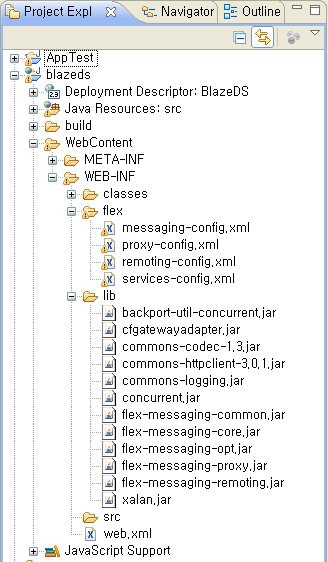
아래의 그림은 blazeds.war 파일을 Eclipse로 import했을 직후의 프로젝트 상태이다.
WEB-INF/flex : RemoteObject를 구동하기 위한 설정파일들(*.xml)이 저장됨
WEB-INF/lib : RemoteObject를 구동하기 위한 자바 라이브러리들(*.jar)이 저장됨.
WEB-INF/web.xml : 톰캣이 요청을 받았을 경우에 blazeds 에 요청을 전달하여 flex.messaging.MessageBrokerServlet이 실행될 수 있도록 연결해 주는 역할을 한다


blazeds.war 파일을 임포트한 직후의 프로젝트 상태
...............................................................................................................................

사용자 삽입 이미지


...............................................................................................................................................................................

web.xml (WEB-INF/web.xml)

<!-- MessageBroker Servlet -->
<servlet>
<servlet-name>MessageBrokerServlet</servlet-name>
<display-name>MessageBrokerServlet</display-name>
<servlet-class>flex.messaging.MessageBrokerServlet</servlet-class>
<init-param>
<param-name>services.configuration.file</param-name>
<param-value>/WEB-INF/flex/services-config.xml</param-value>
</init-param>
<load-on-startup>1</load-on-startup>
</servlet>

<servlet-mapping>
<servlet-name>MessageBrokerServlet</servlet-name>
<url-pattern>/messagebroker/*</url-pattern>
</servlet-mapping>

<welcome-file-list>
<welcome-file>index.html</welcome-file>
<welcome-file>index.htm</welcome-file>
</welcome-file-list>

...............................................................................................................................................................................

service-config.xml (my-amf채널 확인)

<channels>

<channel-definition id="my-amf" class="mx.messaging.channels.AMFChannel">
<endpoint url="
http://{server.name}:{server.port}/{context.root}/messagebroker/amf"
class="flex.messaging.endpoints.AMFEndpoint"/>
</channel-definition>

<channel-definition id="my-secure-amf" class="mx.messaging.channels.SecureAMFChannel">
<endpoint url="https://{server.name}:{server.port}/{context.root}/messagebroker/amfsecure" class="flex.messaging.endpoints.SecureAMFEndpoint"/>
<properties>
<add-no-cache-headers>false</add-no-cache-headers>
</properties>
</channel-definition>

위의 내용 중에서 {server.name}:{server.port}/{context.root} 부분은 브라우저의 요청 URL이며, 이 곳으로 요청을 하면 AMFChannel클래스가 실행되어 AMF(Action Message Format)프로토콜이 적용된다. 이 부분은 Flex Project를 생성할 때 프로젝트 설정창에서 입력하여 지정해 주면 된다. 참고로, AMF 프로토콜은 HTTP 프로토콜을 기반으로 하지만 XML포맷으로 응답하는 형식이 아니라 AMF라는 바이너리 포맷으로 응답을 하기 때문에 성능면에서 일반 HTTP 프로토콜로 통신하는 것보다 빠른 장점을 가지고 있다.

...............................................................................................................................................................................

remoting-config.xml (RemoteObject로 사용할 클래스를 등록함)

<?xml version="1.0" encoding="UTF-8"?>
<service id="remoting-service"
class="flex.messaging.services.RemotingService">

<adapters>
<adapter-definition id="java-object" class="flex.messaging.services.remoting.adapters.JavaAdapter" default="true"/>
</adapters>

<default-channels>
<channel ref="my-amf"/>
</default-channels>

<!-- This is added -->
<destination id="HelloRO">
<properties>
<source>test.HelloWorld</source>
</properties>
<channels>
<channel ref="my-amf"/>
</channels>
</destination>


</service>

위와같이 설정하여 Flex 클라이언트에서 'HelloRO' 라는 이름으로 요청을 할 때 my-amf 채녈을 경유하여 test.HelloWorld클래스가 실행되도록 설정한다.
...............................................................................................................................................................................


HelloWorld.java (WEB-INF/classes/HelloWorld.java)
Flex 클라이언트의 요청에 의해 실행될 원격객체

package test;

import java.io.*;
import java.util.*;

public class HelloWorld implements Serializable
{
public String getMsg()
{
return "Hello from Remot Object!";
}

public int add(int a, int b)
{
return a+b;
}

public java.util.ArrayList<Hashtable> getList(){
ArrayList<Hashtable> al = new ArrayList<Hashtable>();
Hashtable<String,String> ht = new Hashtable<String,String>();
ht.put("empno", "100");
ht.put("ename", "홍길동");
ht.put("phone", "2345-5468-9657");
al.add(ht);
ht = new Hashtable();
ht.put("empno", "200");
ht.put("ename", "홍범도");
ht.put("phone", "645-065-2345");
al.add(ht);
return al;
}
}

...............................................................................................................................................................................

RemoteObjectTest.mxml
원격객체의 getMsg() 메소드를 호출하는 Flex Application

<?xml version="1.0" encoding="utf-8"?>
<mx:Application xmlns:mx="http://www.adobe.com/2006/mxml" layout="absolute">
<mx:Script>
<![CDATA[
import mx.rpc.events.FaultEvent;
import mx.rpc.events.ResultEvent;
import mx.controls.Alert;

private function resultHandler(event:ResultEvent):void{
var msg:String = event.result as String;
Alert.show("원격객체호출성공, "+msg);
}
private function faultHandler(event:FaultEvent):void{
Alert.show("실패!!!!!");
}
]]>
</mx:Script>

<mx:RemoteObject id="ro" destination="HelloRO" showBusyCursor="true"
result="resultHandler(event)" fault="faultHandler(event)">
<mx:method name="getMsg"/>
</mx:RemoteObject>

<mx:Panel y="19" width="250" height="200" layout="absolute" horizontalCenter="0">
<mx:Button y="39" label="원격객체호출" horizontalCenter="0" click="ro.getMsg()"/>
</mx:Panel>

</mx:Application>

...............................................................................................................................................................................


Java Collection을 리턴하는 서버측 객체의 메소드(getList())를 Flex 클라이언트에서 호출하는 경우

<?xml version="1.0" encoding="utf-8"?>
<mx:Application xmlns:mx="http://www.adobe.com/2006/mxml" layout="absolute">
<mx:Script>
<![CDATA[
import mx.rpc.events.FaultEvent;
import mx.rpc.events.ResultEvent;
import mx.controls.Alert;

private function resultHandler(event:ResultEvent):void{
//var msg:String = event.result as String;
var arr:Array = Array(event.result);
for(var i:uint=0;i<arr.length;i++){
for(var n:uint=0;n<arr[i].length;n++){
Alert.show(arr[i][n].empno +":"+ arr[i][n].ename +":"+ arr[i][n].phone);
}
}
}
private function faultHandler(event:FaultEvent):void{
Alert.show("실패!!!!!");
}
]]>
</mx:Script>

<mx:RemoteObject id="ro" destination="HelloRO" showBusyCursor="true"
result="resultHandler(event)" fault="faultHandler(event)">
<!--<mx:method name="getMsg"/>-->
<mx:method name="getList"/>
</mx:RemoteObject>

<mx:Panel y="19" width="250" height="200" layout="absolute" horizontalCenter="0">
<mx:Button y="39" label="원격객체호출" horizontalCenter="0" click="ro.getList()"/>
</mx:Panel>

</mx:Application>


.............................................................................................................................................................................................
서버측의 파라미터를 가진 메소드(add(int a, int b))를 호출하는 Flex 클라이언트의 경우

<?xml version="1.0" encoding="utf-8"?>
<mx:Application xmlns:mx="http://www.adobe.com/2006/mxml" layout="absolute">
<mx:Script>
<![CDATA[
import mx.rpc.events.FaultEvent;
import mx.rpc.events.ResultEvent;
import mx.controls.Alert;

private function resultHandler(event:ResultEvent):void{
var sum:int = event.result as int;
mx.controls.Alert.show("SUM:"+sum);
}
private function faultHandler(event:FaultEvent):void{
Alert.show("실패!!!!!");
}
]]>
</mx:Script>

<mx:RemoteObject id="ro" destination="HelloRO" showBusyCursor="true"
result="resultHandler(event)" fault="faultHandler(event)">
<!--<mx:method name="getMsg"/>-->
<!--<mx:method name="getList"/>-->
<mx:method name="add">
<mx:arguments>
<a>5</a><b>7</b>
</mx:arguments>
</mx:method>
</mx:RemoteObject>

<mx:Panel y="19" width="250" height="200" layout="absolute" horizontalCenter="0">
<mx:Button y="39" label="원격객체호출" horizontalCenter="0" click="ro.add()"/>
</mx:Panel>

</mx:Application>


...........................................................................................................................................................................................
서버측에서 클라이언트로 전달된 Collection 데이터를 Flex 클라이언트에서 DataGrid등을 통해 출력하는 예
..................................................................................................................................................................................................

서버측 코드
.........................................................................................................................................................................................................

package test;

import java.io.*;
import java.util.*;

public class HelloWorld implements Serializable
{
public String getMsg()
{
return "Hello from Remot Object!";
}

public int add(int a, int b)
{
return a+b;
}

// 리턴타입은 Employee[], ArrayList<Employee>, ArrayList<Hashtable> 등으로 설정하면 된다.
public java.util.ArrayList<Employee> getList(){
ArrayList<Employee> al = new ArrayList<Employee>();
al.add(new Employee(100,"홍길동","2345-5468-9657"));
al.add(new Employee(200,"홍범도","645-065-2345"));
return al;
}
}


......................................................................................................................................................................................................................
위와같은 서버코드를 호출하여 수신한 데이터를 DataGrid에 출력하는 예

<?xml version="1.0" encoding="utf-8"?>
<mx:Application xmlns:mx="http://www.adobe.com/2006/mxml" layout="absolute">
<mx:Script>
<![CDATA[
import mx.collections.ArrayCollection;
import mx.rpc.events.FaultEvent;
import mx.rpc.events.ResultEvent;
import mx.controls.Alert;

private function resultHandler(event:ResultEvent):void{
dg.dataProvider = event.result;
}
private function faultHandler(event:FaultEvent):void{
Alert.show("실패!!!!!");
}
]]>
</mx:Script>

<mx:RemoteObject id="ro" destination="HelloRO" showBusyCursor="true"
result="resultHandler(event)" fault="faultHandler(event)">
<mx:method name="getList"/>
</mx:RemoteObject>

<mx:Panel y="19" width="328" height="200" layout="absolute" horizontalCenter="0">
<mx:Button y="7" label="원격객체호출" horizontalCenter="0" click="ro.getList()"/>
<mx:DataGrid id="dg" y="37" width="288" height="113" horizontalCenter="0"/>
</mx:Panel>

</mx:Application>

..............................................................................................................................................................................................................
서버측에서 DTO로 사용된 클래스

package test;

public class Employee implements java.io.Serializable{
public int empno;
public String ename;
public String phone;

public Employee(int empno, String ename, String phone){
this.empno=empno;
this.ename=ename;
this.phone=phone;
}
}


.............................................................................................................................................................................................................................

Eclipse에서 Flex 클라이언트에서 서버상의 원격객체(RemoteObject)에 접속하고자 한다면 Project를 생성할 때 다음과 같은 절차를 따른다

사용자 삽입 이미지

...............................................................................................................................................................................

사용자 삽입 이미지

...............................................................................................................................................................................

아래의 항목 중에서
Root folder : Flex Project가 컴파일되어 생성되는 실행파일들이 복사될 웹프로젝트의 루트를 지정(RemoteObject가 있는 웹프로젝트)
Root URL : service-config.xml 파일의 endpoint 태그 url속성을 설정하게 될 서버:포트/컨텍스트 입력
Context root : Flex Application에서 접속하고자 하는 사이트의 Context root

사용자 삽입 이미지
...............................................................................................................................................................................

위와같은 절차로 프로젝트가 완성된 후에도 다음과 같은 방법으로 연결하고자 하는 서버의 정보를 설정할 수 있다.

사용자 삽입 이미지

...............................................................................................................................................................................

사용자 삽입 이미지

...............................................................................................................................................................................

아래의 그림은 위와 같은 절차에 따라 Flex Application을 생성하고 mxml을 작성한 후 이상없이 컴파일되고 난 후의 웹 프로젝트의 상태이다. WEB-INF/classes/ 안에는 원격객체로 등록된 test.HelloWorld.java 가 들어 있다.

사용자 삽입 이미지

...............................................................................................................................................................................

웹프로젝트 안에서 SWF 파일을 포함하고 있는 html 파일을 실행하여 Flex Application을 브라우저에 나타나게 한다.
사용자 삽입 이미지

...............................................................................................................................................................................

다음과 같이 Flex Application이 실행되어 버튼을 누르면 위에서 설정한 서버상의 원격객체(RemoteObject)에 접속하여 메소드를 호출하게 된다.
사용자 삽입 이미지

...............................................................................................................................................................................

다음과 같이 원격객체(RemoteObject)의 getMsg()메소드 실행이 성공적으로 이루어진 것을 확인할 수 있다.
사용자 삽입 이미지


Posted by 1010
00.Flex,Flash,ActionScript2013. 3. 18. 09:20
반응형

FLA파일을 작성하고 라이브러리에 무비클립을 등록하고서, Linkage를 통해 Class를 지정해 주었을 때 이 무비클립들을 스테이지로 끌어낼 수가 있는데, 여러개가 일정한 규칙을 가지고 있을때 for문으로 사용하기 위한 방법 입니다.

기존 AS2.0에서는 Linkage 명 그대로 for문을 사용하여 attach 할 수 있었으나 AS3.0에서는 그 방법을 사용할 수가 없어서 처음에 무척 애를 먹었습니다. 그렇다고 하나하나 등록하여 사용하기에는 코드도 지저분해지고 복잡해집니다.

이때 사용할 수 있는 메소드가 있는데 getDefinitionByName() 입니다.

예) 라이브러리에 MC1 부터 MC5까지 Linkage 되어있다면 아래와 같은 방법으로 사용이 가능합니다.

import flash.utils.getDefinitionByName;
import flash.display.DisplayObject;

for(var i:Number = 1; i <= 5; i++)
{
var ClassReference:Class = getDefinitionByName("MC" + i) as Class;
var obj:Object = new ClassReference();
addChild(DisplayObject(obj));
}

출처 : http://blog.naver.com/applenamu3/70083260118


Posted by 1010
00.Flex,Flash,ActionScript2013. 3. 15. 19:32
반응형

<?xml version="1.0" encoding="utf-8"?>
<mx:Application
 xmlns:mx="http://www.adobe.com/2006/mxml"
 xmlns:s="library://ns.adobe.com/flex/spark"
 xmlns:fx="http://ns.adobe.com/mxml/2009"
 xmlns:c="component.*"
 layout="absolute" xmlns:local="*">
 <mx:Script>
  <![CDATA[
   [Bindable]public var initDG:Array = [
    {year:2006, t1:"t12", t2:"t33", test1:new MultiRowVO("a1","b1"), data1:new MultiRowVO("d1","t1"),data2:new MultiRowVO("df","wef")},
    {year:2007, t1:"t13", t2:"t43", test1:new MultiRowVO("a2","b2"), data1:new MultiRowVO("d2","t2"),data2:new MultiRowVO("df","wef")},
    {year:2008, t1:"t14", t2:"t53", test1:new MultiRowVO("a3","b3"), data1:new MultiRowVO("d3","t3"),data2:new MultiRowVO("df","wef")},
    {year:2009, t1:"t15", t2:"t63", test1:new MultiRowVO("a4","b4"), data1:new MultiRowVO("d4","t4"),data2:new MultiRowVO("df","wef")},
    {year:2010, t1:"t16", t2:"t73", test1:new MultiRowVO("a5","b5"), data1:new MultiRowVO("d5","t5"),data2:new MultiRowVO("df","wef")}
   ]
  ]]>
 </mx:Script>
 <mx:AdvancedDataGrid id="dataGrid" dataProvider="{initDG}" sortExpertMode="true" width="100%" height="100%">
  <mx:groupedColumns>
   <mx:AdvancedDataGridColumn headerText="year"  dataField="year"/>
   <mx:AdvancedDataGridColumn headerText="test1" dataField="test1">
    <mx:itemRenderer><mx:Component><local:rowVBox propertyName="test1"/></mx:Component></mx:itemRenderer>
   </mx:AdvancedDataGridColumn>
   <mx:AdvancedDataGridColumn headerText="data1" dataField="data1">
    <mx:itemRenderer><mx:Component><local:rowVBox propertyName="data1"/></mx:Component></mx:itemRenderer>
   </mx:AdvancedDataGridColumn>
   <mx:AdvancedDataGridColumn headerText="data2" dataField="data2">
    <mx:itemRenderer><mx:Component><local:rowVBox propertyName="data2"/></mx:Component></mx:itemRenderer>
   </mx:AdvancedDataGridColumn>
  </mx:groupedColumns>
 </mx:AdvancedDataGrid>
</mx:Application>


-- rowVBox.mxml

<?xml version="1.0" encoding="utf-8"?>
<mx:VBox xmlns:mx="http://www.adobe.com/2006/mxml" width="100%" height="100%" verticalGap="0">

<mx:Script>
    <![CDATA[

        [Bindable] private var _propertyName:String;
        [Bindable] private var mydata:Object;
       
        public function set propertyName(p:String):void {
            this._propertyName = p;
        }

        public function get propertyName():String {
            return this._propertyName;
        }
       
       
        public override function set data(value:Object):void {
            mydata = value;
        }
    ]]>
</mx:Script>
    <mx:Label text="{mydata[propertyName].p1}" width="100%" height="20" textAlign="center"/>
    <mx:HRule width="100%"/>                   
    <mx:Label text="{mydata[propertyName].p2}" width="100%" height="20" textAlign="center"/>
</mx:VBox>


Posted by 1010
00.Flex,Flash,ActionScript2013. 3. 15. 17:23
반응형

<?xml version="1.0" encoding="utf-8"?>
<mx:Application
 xmlns:mx="http://www.adobe.com/2006/mxml"
 xmlns:s="library://ns.adobe.com/flex/spark"
 xmlns:fx="http://ns.adobe.com/mxml/2009"
 xmlns:c="component.*"
 layout="absolute">
 <mx:Script>
  <![CDATA[
   [Bindable]public var initDG:Array = [
    {title:2006, test1:new MultiRowVO("aa","bb"), data1:new MultiRowVO("123","456"),data2:new MultiRowVO("df","wef")},
    {title:2007, test1:new MultiRowVO("aa","bb"), data1:new MultiRowVO("123","456"),data2:new MultiRowVO("df","wef")},
    {title:2008, test1:new MultiRowVO("aa","bb"), data1:new MultiRowVO("123","456"),data2:new MultiRowVO("df","wef")},
    {title:2009, test1:new MultiRowVO("aa","bb"), data1:new MultiRowVO("123","456"),data2:new MultiRowVO("df","wef")},
    {title:2010, test1:new MultiRowVO("aa","bb"), data1:new MultiRowVO("123","456"),data2:new MultiRowVO("df","wef")}
   ]
  ]]>
 </mx:Script>
 <mx:AdvancedDataGrid id="dataGrid" dataProvider="{initDG}" sortExpertMode="true" width="100%" height="100%">
  <mx:groupedColumns>
   <mx:AdvancedDataGridColumn  headerText="year" dataField="year"/>
   <mx:AdvancedDataGridColumn  headerText="data1" dataField="data1" id="data1" itemRenderer="co"/>
   <mx:AdvancedDataGridColumn  headerText="data2" dataField="data2" id="data2" itemRenderer="tttt"/>
   <!--<mx:AdvancedDataGridColumn  headerText="data2" dataField="data2">
    <mx:itemRenderer>
     <mx:Component>
      <mx:VBox width="100%" height="100%" verticalGap="0">
                            <mx:Label text="{data.data2.p1}" width="100%" height="20" textAlign="center"/>
                            <mx:HRule width="100%"/>                   
                            <mx:Label text="{data.data2.p2}" width="100%" height="20" textAlign="center"/>
                         </mx:VBox>
     </mx:Component>
    </mx:itemRenderer>
   </mx:AdvancedDataGridColumn>-->
  </mx:groupedColumns>

  
 </mx:AdvancedDataGrid>
</mx:Application>

-- co.mxml

<?xml version="1.0" encoding="utf-8"?>
<mx:VBox xmlns:mx="http://www.adobe.com/2006/mxml" width="100%" height="100%" verticalGap="0">
 <mx:Label text="{data.data1.p1}" width="100%" height="20" textAlign="center"/>
 <mx:HRule width="100%"/>                   
 <mx:Label text="{data.data1.p2}" width="100%" height="20" textAlign="center"/>
</mx:VBox>


-- tttt.mxml

<?xml version="1.0" encoding="utf-8"?>
<mx:AdvancedDataGridItemRenderer xmlns:mx="http://www.adobe.com/2006/mxml">
 <mx:Script>
  <![CDATA[
   override public function set data(data:Object):void{
    if(data != null){
     p1.text = data.p1;
     p2.text = data.p2;
    }
   }
  ]]>
 </mx:Script>
 
 <mx:VBox width="100%" height="100%" verticalGap="0">
 <mx:Label id="p1" text="{data.data1.p1}" width="100%" height="20" textAlign="center"/>
 <mx:HRule width="100%"/>                   
 <mx:Label id="p2" text="{data.data1.p2}" width="100%" height="20" textAlign="center"/>
</mx:VBox>

</mx:AdvancedDataGridItemRenderer>


Posted by 1010
00.Flex,Flash,ActionScript2013. 3. 12. 11:37
반응형

출처 : http://www.stevekamerman.com/2008/06/bidirectional-localconnections-in-actionscript-3-flex-2-flex-3-flash-cs3/


Although I use AMFPHP RemoteObjects with the Cairngorm Framework everyday, I never had a need for a simple LocalConnection. LocalConnections let you communicate between running SWFs, the only problem is that they are unidirectional. SWF A can make a new LocalConnection to SWF B and invoke it’s methods, but SWF B can’t contact SWF A. The way to get around this is to make another LocalConnection back from SWF B to SWF A. Trying to wrap my head around receiving and sending connections was starting to make me angry! They are annoyingly misleading – the receiving SWF needs to .connect() to a named connection, whereas the sending SWF doesn’t – it just calls .send() with the same named connection. I figured I could do the world a favor and abstract this confusion for you.

Here is the result (demonstrated with a Flex SWF and a Flash SWF):

Flex SWF


Flash SWF


In both the Flex MXML and the Flash FLA, I am including my BiDirLocalConnection class and it does all the hard work for me.

To make this bidirectional concept easier to handle, I introduced something called Roles. There are two roles available to your SWFs: Master and Slave. You must pick one of these roles when you instantiate the BiDirLocalConnection Object. If you have more than one running SWF in a given Role you will get an error on the newest one.

Here’s an example of how to use the class in Flex:

import net.teratechnologies.common.BiDirLocalConnection;

private var connection:BiDirLocalConnection;

private function init():void{
connection = new BiDirLocalConnection(BiDirLocalConnection.ROLE_MASTER,this);
connection.connect();
}

The constructor takes three arguments (the third is optional):

BiDirLocalConnection(role:String,callbackScope:Object,connectionBaseName:String="BiDirConnection")

- role: The role of this SWF (ROLE_MASTER or ROLE_SLAVE)
- callbackScope: When a SWF connects to this one and tries to invoke a method (call a function), where should it look to find the method? Normally you specify this so the remote SWF has access to the functions in your current scope.
- connectionBaseName: This optional argument is only required if you have more than one BiDirLocalConnection at the same time. You can use any string here and it will serve as the prefix for the two LocalConnection connectionNames that are used.

Here is the complete code from the Slave in Flash CS3 as seen above. There are three things on the stage: TextArea (receiveText), TextInput (sendText) and a Button (sendButton):

import net.teratechnologies.common.BiDirLocalConnection;

var connection:BiDirLocalConnection;

function init():void{
sendButton.addEventListener(MouseEvent.CLICK,send);
connection = new BiDirLocalConnection(BiDirLocalConnection.ROLE_SLAVE,this);
connection.connect();
}
function send(e:Event):void{
connection.send('showText',sendText.text);
}
function showText(t:String):void{
receiveText.text = "Received: "+t+"\n"+receiveText.text;
}

init();
stop();

Now here is the complete code for the Flex MXML file:

<?xml version="1.0" encoding="utf-8"?>
<mx:Application xmlns:mx="http://www.adobe.com/2006/mxml" layout="vertical" creationComplete="init()">
<mx:Script>
<![CDATA[
import net.teratechnologies.common.BiDirLocalConnection;

private var connection:BiDirLocalConnection;

private function init():void{
sendButton.addEventListener(MouseEvent.CLICK,send);
connection = new BiDirLocalConnection(BiDirLocalConnection.ROLE_MASTER,this);
connection.connect();
}
private function send(e:Event):void{
connection.send('showText',sendText.text);
}
public function showText(t:String):void{
receiveText.text = "Received: "+t+"\n"+receiveText.text;
}

]]>
</mx:Script>
<mx:Panel width="100%" height="100%" layout="absolute" title="Flex 2/3">
<mx:TextArea id="receiveText" right="10" bottom="39" left="10" top="10."/>
<mx:TextInput id="sendText" left="10" right="72" bottom="10"/>
<mx:Button label="Send" id="sendButton" right="10" bottom="10"/>
</mx:Panel>

</mx:Application>

It really is quite simple, the SWFs are calling each other’s “showText” functions with the text of the TextInput box as an argument. You can pass as many arguments as you want to connection.send(), and they don’t need to be simple Strings.

Finally, here is the ActionScript Code for the BiDirLocalConnection class itself:

package net.teratechnologies.common {
import flash.net.LocalConnection;

public class BiDirLocalConnection{

public static const ROLE_MASTER:String = "master";
public static const ROLE_SLAVE:String = "slave";

private var txConnName:String;
private var rxConnName:String;
private var txLC:LocalConnection = new LocalConnection();
private var rxLC:LocalConnection = new LocalConnection();
private var callbackScope:Object;

public function BiDirLocalConnection(role:String,callbackScope:Object,connectionBaseName:String="BiDirConnection"){
if(role == ROLE_MASTER){
txConnName = connectionBaseName + "_TX";
rxConnName = connectionBaseName + "_RX";
}else{
rxConnName = connectionBaseName + "_TX";
txConnName = connectionBaseName + "_RX";
}
this.callbackScope = callbackScope;
}
public function connect():void{
trace(rxConnName);
rxLC.connect(rxConnName);
rxLC.client = callbackScope;
}
public function send(methodName:String,...rest):void{
txLC.send(txConnName,methodName,rest);
}
}
}


Posted by 1010
00.Flex,Flash,ActionScript2013. 3. 12. 10:55
반응형
Posted by 1010